
All Forum Comments

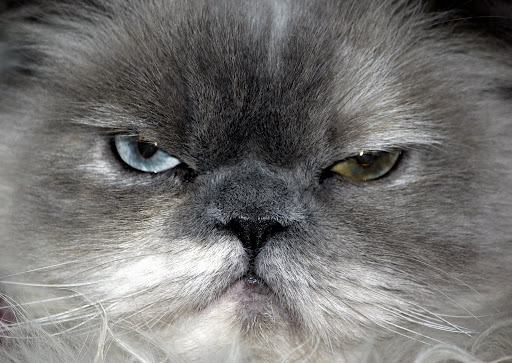
Personally I think it was taken to close, as you say that this is how it has come from the camera.
What I tend to do is shoot it like a normal portrait then crop in when you do the editing. Sometimes you can get 2-3, maybe more, shots from one image.
C&C
~ Shoot further back, crop later
~ Image is not totally sharp, always focus on the eyes
~ It is a tad under exposed, no need to use flash, maybe reflect some light into the shadows.
~ Whiten the eyes very slightly in PS or similar to bring out the whites, set the dodging tool to about 40% and set to highlights.
Regarding the framing, I know you can't do anything about it now but I would have cropped a tad below the lips so that they are all in view. This crop, to me, looks odd.
Try not to use flash to brighten the shadows, outside there is enough natural light so there is no need to add to it. A sheet of white card or paper is enough if you haven't got a reflector.
Hope this helps
Paul
What I tend to do is shoot it like a normal portrait then crop in when you do the editing. Sometimes you can get 2-3, maybe more, shots from one image.
C&C
~ Shoot further back, crop later
~ Image is not totally sharp, always focus on the eyes
~ It is a tad under exposed, no need to use flash, maybe reflect some light into the shadows.
~ Whiten the eyes very slightly in PS or similar to bring out the whites, set the dodging tool to about 40% and set to highlights.
Regarding the framing, I know you can't do anything about it now but I would have cropped a tad below the lips so that they are all in view. This crop, to me, looks odd.
Try not to use flash to brighten the shadows, outside there is enough natural light so there is no need to add to it. A sheet of white card or paper is enough if you haven't got a reflector.
Hope this helps
Paul
Comment by paullucas posted on Newbie pic at 01/06/2009 - 00:54
Anvh wrote:
Thank you Paul for all the information, time to save some money.
I'm not planning to ship oversea so need to find all of that here, I hope I can find some, probable not though.
I can see if they can ship stuff to you, I have to contact them this week as I need a new brolly. I could ask how much it would cost.Thank you Paul for all the information, time to save some money.
I'm not planning to ship oversea so need to find all of that here, I hope I can find some, probable not though.
Paul
Comment by paullucas posted on Considering a studio kit at 31/05/2009 - 18:37
Right after a good sleep and a decent lay in I’m more prepared to answer the studio flash questions. Like I said above, I have 2 businesses in photography, one on my own where I mainly do portraits and the second I am partnered with my wife’s cousin who also has a business of her own as a portrait photographer. The second business is larger and we cover large weddings, and events such as: dinners, corporate dinners etc and it’s these events as well as our own portrait businesses that we use the mobile studios.
My equipment comprises of:
2 studio flash head units
2 stands
2 umbrellas
1 soft box
light meter
And flash sync cables
I also have a background support system and 4 backgrounds of different sizes and colours.
When I go to a shoot, which may be a large room for 200+ guests or a small dining room for a small family, I take along 3 bags for the studio equipment, my camera bag and various lenses (although I usually only use the one, others are taken just in case) and my laptop.
So now I have told you what my kit is and the bags I lug around, I’ll go on to the equipment used, the stores I go to and a rough idea on price….it’s not as much as you think!
If I start from the flashes and work down:
The flash units I bought from an online company, which was recommended to me by a fellow pro, aren’t your top of the range manufacturer. I looked into makes such as Elinchrome and Bowens, but when you are first setting up in a business the last thing you want to do is spend a fortune. So I went to a company that are only found on the internet, I was amazed at the prices, here’s the address: http://www.photodeals.co.uk/home.php
So if you have a look on the site you will see how cheap they are…now please don’t get put off by that as these head units are actually made by Bowens themselves and all the accesseries are compatable with Bowens kit, their whole range, the casing of the heads are metal and not plastic. There are 3 kits available and I would personally recommend the 150W or 300W kits as they are way powerful enough. I have used the 150W and it produced an even light for me to photograph 12 people around a background.
Both kits come with a brolly and a softbox, don’t be put off by the fact that there aren’t 2 soft boxes though, to tell you the truth, sometimes there just isn’t enough room for 1 soft box let alone 2. I tend to use 2 large brollies, one for reflection (these are silver lined and the open end of the brolly is facing the subject, this allows the flash to bounce from the brolly and onto the subject with a good even light (the bigger the brolly the better as it giver a higher spread of light)), the other for diffusion and is opaque, this gives a softer light. The soft box will diffuse the light more, but will take up a lot of room and if space is a problem then I recommend using 2 umbrellas.
If you go to Warehouse express: http://www.warehouseexpress.com/product/default.aspx?sku=1029931 you will see that it’s a lot more expensive but it’s the same kit but without the branding. Just like a Tesco Jaffa Cake compared to a Mcvities Jaffa cake, both made by the same company but no difference, except Tesco’s have more chocolate and jelly and for the difference in money…I’ll leave it at that.
If you have anymore questions about the flash heads then please ask me and I’ll try to answer them, but let me say that I have had this make for 4 years now and they have never let me down. The modelling bulbs are cheap and they last about 6 months - or depending how much use you give them, sometimes maybe a year.
The stands are well made as well and are air cushioned with spring dampers in the legs, a must for this type of work.
I have a Sekonic flash meter that I used to use all the time, I say used to but I got out of the habit of getting it out. When I was at college and using film, I always got the light meter out and took ages measuring the it using either tungsten or flash. Now though, using digital, it’s so, so much easier. I can now take into account the overhead lighting (if there is any) judge what the f/stop will be. Although, for beginners, I would strongly recommend getting one as you will definetly need one. Here’s the one that I have, you may get it cheaper but I got it from here: http://www.warehouseexpress.com/product/default.aspx?sku=1006844
It’s entirely up to you whether you get yourself a radio trigger kit. I have always used one because of the risk of people, young and old, tripping over them. Basically if they trip over a trailing cable not only will your precious lights go over…God forbid, but also the trippee could sue you for every penny. I have all the insurances and Liability policies, but for yourselves…It’s probably best if you get one! I use Bowens Pulsar http://www.warehouseexpress.com/product/default.aspx?sku=1005164 but there are cheaper out there such as http://www.photodeals.co.uk/home.php?cat=14 but you pay for what you get. I started with the one above but it does tend to suffer from interference from other radio waves, interference causes misfire and you end up losing that perfect shot…that’s from experience!
If you want me to go into backgrounds then I’ll do that another time.
There is a much cheaper alternative to flash and that’s Tungsten. This gives you a constant even light. One of the downsides is that Tungsten gets very hot after a period of time, think how the model feels being stuck under a hot light throughout the session. Personally I much prefer flash as there is much more control also if you are going to spend money setting up a studio then flash, in my opinion, is the best option.
What I have done here, as you can see, is to advise you on where to buy a decent studio flash system. I hope it saves you time in hunting for the right website. There are other makes, such as Interfit, Eagle Eyes, etc. I found these weren’t built as well as the ones that I chose.
If you want information on how to use the equipment or anything else, then please either continue on this thread or PM me
Paul
My equipment comprises of:
2 studio flash head units
2 stands
2 umbrellas
1 soft box
light meter
And flash sync cables
I also have a background support system and 4 backgrounds of different sizes and colours.
When I go to a shoot, which may be a large room for 200+ guests or a small dining room for a small family, I take along 3 bags for the studio equipment, my camera bag and various lenses (although I usually only use the one, others are taken just in case) and my laptop.
So now I have told you what my kit is and the bags I lug around, I’ll go on to the equipment used, the stores I go to and a rough idea on price….it’s not as much as you think!
If I start from the flashes and work down:
The flash units I bought from an online company, which was recommended to me by a fellow pro, aren’t your top of the range manufacturer. I looked into makes such as Elinchrome and Bowens, but when you are first setting up in a business the last thing you want to do is spend a fortune. So I went to a company that are only found on the internet, I was amazed at the prices, here’s the address: http://www.photodeals.co.uk/home.php
So if you have a look on the site you will see how cheap they are…now please don’t get put off by that as these head units are actually made by Bowens themselves and all the accesseries are compatable with Bowens kit, their whole range, the casing of the heads are metal and not plastic. There are 3 kits available and I would personally recommend the 150W or 300W kits as they are way powerful enough. I have used the 150W and it produced an even light for me to photograph 12 people around a background.
Both kits come with a brolly and a softbox, don’t be put off by the fact that there aren’t 2 soft boxes though, to tell you the truth, sometimes there just isn’t enough room for 1 soft box let alone 2. I tend to use 2 large brollies, one for reflection (these are silver lined and the open end of the brolly is facing the subject, this allows the flash to bounce from the brolly and onto the subject with a good even light (the bigger the brolly the better as it giver a higher spread of light)), the other for diffusion and is opaque, this gives a softer light. The soft box will diffuse the light more, but will take up a lot of room and if space is a problem then I recommend using 2 umbrellas.
If you go to Warehouse express: http://www.warehouseexpress.com/product/default.aspx?sku=1029931 you will see that it’s a lot more expensive but it’s the same kit but without the branding. Just like a Tesco Jaffa Cake compared to a Mcvities Jaffa cake, both made by the same company but no difference, except Tesco’s have more chocolate and jelly and for the difference in money…I’ll leave it at that.
If you have anymore questions about the flash heads then please ask me and I’ll try to answer them, but let me say that I have had this make for 4 years now and they have never let me down. The modelling bulbs are cheap and they last about 6 months - or depending how much use you give them, sometimes maybe a year.
The stands are well made as well and are air cushioned with spring dampers in the legs, a must for this type of work.
I have a Sekonic flash meter that I used to use all the time, I say used to but I got out of the habit of getting it out. When I was at college and using film, I always got the light meter out and took ages measuring the it using either tungsten or flash. Now though, using digital, it’s so, so much easier. I can now take into account the overhead lighting (if there is any) judge what the f/stop will be. Although, for beginners, I would strongly recommend getting one as you will definetly need one. Here’s the one that I have, you may get it cheaper but I got it from here: http://www.warehouseexpress.com/product/default.aspx?sku=1006844
It’s entirely up to you whether you get yourself a radio trigger kit. I have always used one because of the risk of people, young and old, tripping over them. Basically if they trip over a trailing cable not only will your precious lights go over…God forbid, but also the trippee could sue you for every penny. I have all the insurances and Liability policies, but for yourselves…It’s probably best if you get one! I use Bowens Pulsar http://www.warehouseexpress.com/product/default.aspx?sku=1005164 but there are cheaper out there such as http://www.photodeals.co.uk/home.php?cat=14 but you pay for what you get. I started with the one above but it does tend to suffer from interference from other radio waves, interference causes misfire and you end up losing that perfect shot…that’s from experience!
If you want me to go into backgrounds then I’ll do that another time.
There is a much cheaper alternative to flash and that’s Tungsten. This gives you a constant even light. One of the downsides is that Tungsten gets very hot after a period of time, think how the model feels being stuck under a hot light throughout the session. Personally I much prefer flash as there is much more control also if you are going to spend money setting up a studio then flash, in my opinion, is the best option.
What I have done here, as you can see, is to advise you on where to buy a decent studio flash system. I hope it saves you time in hunting for the right website. There are other makes, such as Interfit, Eagle Eyes, etc. I found these weren’t built as well as the ones that I chose.
If you want information on how to use the equipment or anything else, then please either continue on this thread or PM me
Paul
Comment by paullucas posted on Considering a studio kit at 31/05/2009 - 11:35
I am a mobile portrait photographer and have a great kit. I'll come back to this subject again later today.
Another member has asked me to provide some details of my kit and where to get it from.
I have been a professional in this field for 4 years now and have been into photography for about 20years.
I will touch on something quickly though, I wouldn't recommend using 2 flashguns for portrait work. For one, you will need a modelling light to make sure there are no shadows. Studio flashes give a much more even and controllable light.
I will, if you want, give more advice later today and also I'll try to answer any questions.
Paul
Another member has asked me to provide some details of my kit and where to get it from.
I have been a professional in this field for 4 years now and have been into photography for about 20years.
I will touch on something quickly though, I wouldn't recommend using 2 flashguns for portrait work. For one, you will need a modelling light to make sure there are no shadows. Studio flashes give a much more even and controllable light.
I will, if you want, give more advice later today and also I'll try to answer any questions.
Paul
Comment by paullucas posted on Considering a studio kit at 31/05/2009 - 00:25
JudithAnn wrote:
Thank for the suggestions...I will try all the suggestions...Tell me Paul do you think the first photo could be used as a theme for 'hands' as is the present competition in the gallery, or is it to cluttered for that?
Try doing a close crop on the hands and the babies head, take out the guys legs.Thank for the suggestions...I will try all the suggestions...Tell me Paul do you think the first photo could be used as a theme for 'hands' as is the present competition in the gallery, or is it to cluttered for that?
JudithAnn wrote:
Done....cropped closer
Much, much, much better!
Done....cropped closer
Paul
Comment by paullucas posted on K-m Pictures from Judith Ann at 30/05/2009 - 00:24
To be honest, I like images 2 and 3 the best.
No. 3 is funny, and yes, it has that lookie-likie feel to it
No. 2 nice close portrait of a stunning cat. Personally though I would crop in a tad closer and get rid of the clutter on the left hand side. Maybe crop evenly on both sides as the main part of the cat is the eyes, make them more of a feature.
No. 1 To be brutally honest, it does nothing for me...but I am like that as I am a portrait photographer. I do like the idea but I would like to see more of the babies body as it does seem very close cropped. The idea showing the father supporting his babies head is good but the baby is at a wrong angle.
Also I would crop closer to the legs on the right side and clone out the cord of the seat.
For the 1st image, these are just my views and aren't meant to be taken personally. It's just what I would do.
Hope that helps
Paul
No. 3 is funny, and yes, it has that lookie-likie feel to it
No. 2 nice close portrait of a stunning cat. Personally though I would crop in a tad closer and get rid of the clutter on the left hand side. Maybe crop evenly on both sides as the main part of the cat is the eyes, make them more of a feature.
No. 1 To be brutally honest, it does nothing for me...but I am like that as I am a portrait photographer. I do like the idea but I would like to see more of the babies body as it does seem very close cropped. The idea showing the father supporting his babies head is good but the baby is at a wrong angle.
Also I would crop closer to the legs on the right side and clone out the cord of the seat.
For the 1st image, these are just my views and aren't meant to be taken personally. It's just what I would do.
Hope that helps
Paul
Comment by paullucas posted on K-m Pictures from Judith Ann at 29/05/2009 - 20:10
What format did you shoot it on, Raw or J-peg?
Personally I would adjust the brightness or exposure slightly to bring out the crinkly bits around the middle. Also this would lighten the stamen.
A crop would also benefit the flower to cut out the clutter on the left. Maybe a square crop, something like 12"x12"
You could either go for the outside of the flower or a closer crop which shows that nice crinkly middle bit around the stamen.
To me it looks like a nice picture, maybe you could have given a bit more room around the bottom petals, but then again if you wanted the close crop then that wouldn't matter.
I like it as given the right treatment it has great potential
Paul
Personally I would adjust the brightness or exposure slightly to bring out the crinkly bits around the middle. Also this would lighten the stamen.
A crop would also benefit the flower to cut out the clutter on the left. Maybe a square crop, something like 12"x12"
You could either go for the outside of the flower or a closer crop which shows that nice crinkly middle bit around the stamen.
To me it looks like a nice picture, maybe you could have given a bit more room around the bottom petals, but then again if you wanted the close crop then that wouldn't matter.
I like it as given the right treatment it has great potential
Paul
Comment by paullucas posted on New K20D with new sigma 105mm macro lens at 29/05/2009 - 20:00
You are perfectly in your rights to approach Microglobe and say that you want the lens for the price it is advertised.
I did that once with a tripod head (not with microglobe) and they honoured it. They tried to state that it was a mistake but I was I wasn't having it.
Good bargain for me
Paul
I did that once with a tripod head (not with microglobe) and they honoured it. They tried to state that it was a mistake but I was I wasn't having it.
Good bargain for me
Paul
Comment by paullucas posted on microglobe at 29/05/2009 - 19:53
Pothers wrote:
I just wish I could get the same results as Pauly.
Maybe you should try to get the same results, show them on here. There's no harm in trying is there I just wish I could get the same results as Pauly.
Paul
Comment by paullucas posted on No Comment at 29/05/2009 - 19:48


If anyone want's to know how this works, send me a cheque for £100 and I'll send you my guide of how to make money from gullible strangers.
Paul