
All Forum Comments

Comment by MrB posted on Marlow Church at 09/09/2014 - 21:12
Inside Marlow Church yesterday:
#1

#2

#3

#4

#5
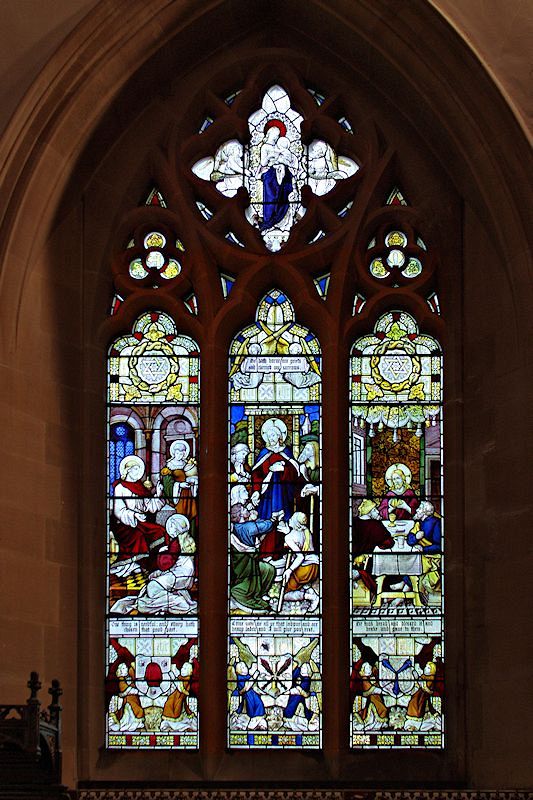
Cheers.
Philip
#1

#2

#3

#4

#5

Cheers.
Philip
Comment by MrB posted on Marlow Church at 08/09/2014 - 11:59
This is just a general point. I have a Toshiba laptop (now over 2 years old) that is used mainly for processing photos and using the Interweb. It cost about £350, has an AMD processor, 4GB RAM, a Radion GPU, and Windows 7 64-bit OS. When used at home it is connected to a separate monitor, plus a wireless keyboard and mouse; and of course, I can take the laptop with me when I go away from home. I usually have at least the web, Photoshop Elements, and PaintShop Pro running concurrently, and the speed of processing photos from a K-5 II seems fine to me. So it just seems that some suggestions on this and other forums can be somewhat OTT, if all that is required is a machine for processing still images. But obviously, each to his own.
Cheers.
Philip
Cheers.
Philip
Comment by MrB posted on Desktop PC choice at 05/09/2014 - 15:18
If it helps, Jules, this translator does the job in IE, Firefox and Opera -
http://labs.microsofttranslator.com/bookmarklet/
Cheers.
Philip
http://labs.microsofttranslator.com/bookmarklet/
Cheers.
Philip
Comment by MrB posted on Sigma Superzoom coming??? at 05/09/2014 - 13:30
MattMatic wrote:
For example, my day-to-day mode is Av, and I have set the ISO to be controlled by the spare e-dial. Once setup that way, the ISO is also displayed in the viewfinder, and can be controlled easily.
Matt
I also have settled on Av Mode for most of my photography. I realise that this is going a bit off topic, but I have set the rear dial to control Aperture and the front dial to control Exposure Compensation, and I'm finding that is a very good combination in practice. Control of ISO (or Auto ISO) is, of course, still available in the usual way.For example, my day-to-day mode is Av, and I have set the ISO to be controlled by the spare e-dial. Once setup that way, the ISO is also displayed in the viewfinder, and can be controlled easily.
Matt
Cheers.
Philip
Comment by MrB posted on ISO help... at 05/09/2014 - 11:34
Auto ISO works in Green, P, Tv, Av, and TAv Modes. The examples I described above apply in P (including Av-Hyper), and Av Modes because, obviously, in Tv and TAv, the user selects the shutter speed. (My camera is the K-5 II - I expect this stuff will also apply to the K-5 and K-5 IIs)
Cheers.
Philip
Cheers.
Philip
Comment by MrB posted on ISO help... at 04/09/2014 - 22:05
Snoops27 wrote:
In the K-5 11s, in the ISO auto settings, there is the facility to change the parameters so that the sensitivity change will be either at a slow, standard(default), or fast rate. Are there any situations in which one would move from the standard setting?
In the semi-auto shooting modes -In the K-5 11s, in the ISO auto settings, there is the facility to change the parameters so that the sensitivity change will be either at a slow, standard(default), or fast rate. Are there any situations in which one would move from the standard setting?
If set to Slow, the camera will keep the ISO as low as it can, while still giving a shutter speed adequate for the focal length of the lens being used. This could be important in a hand-held landscape shot, where you might want the noise to be as low as possible.
If set to Fast, the camera will raise the ISO (but keeping it below the set limit if it can) to give a much faster shutter speed for the focal length of the lens being used. This could be important if you want to reduce the motion blur of a moving subject.
Cheers.
Philip
Comment by MrB posted on ISO help... at 04/09/2014 - 19:34
I like all these, Nigel, nice colours and clarity - did you do much processing on them?
Cheers.
Philip
P.S. Congrats on the new McGregNi!
Cheers.
Philip
P.S. Congrats on the new McGregNi!
Comment by MrB posted on K7 Visits Dorset .... the 1st Overview at 28/08/2014 - 00:03
The specs don't indicate that it's WR, so they must be announcing it quickly (28th) to avoid all those leaks.
Cheers.
Philip
Cheers.
Philip
Comment by MrB posted on New Camera Pentax Leaked at 27/08/2014 - 18:53
Definitely colour for me.
Cheers.
Philip
Cheers.
Philip
Comment by MrB posted on another mono or color at 24/08/2014 - 10:56


Cheers.
Philip