Monitor Calibration

Posted 08/01/2011 - 09:48
Link
Thanks Chris, I've already got the CD, just never used it.
I think there's a new version of the Argyll/dispcal stuff out
I might try that first. The previous version didn't work on
XPPro couldn't see the driver. The picture on my monitor is
really good, but the two white squares are merged into one.
I think there's a new version of the Argyll/dispcal stuff out
I might try that first. The previous version didn't work on
XPPro couldn't see the driver. The picture on my monitor is
really good, but the two white squares are merged into one.
Half Man... Half Pentax ... Half Cucumber
Pentax K-1 + K-5 and some other stuff
Algi
Pentax K-1 + K-5 and some other stuff
Algi

Posted 08/01/2011 - 10:17
Link
Good as automated calibration systems may - or may not be - they can't make a poor monitor with a limited colour gamut and lots on consumer-fooling trickery (10 billion:1 contrast ratio claims etc etc) significantly better. For many people, they would have been better spending the £300 cost of a calibration system on a better monitor in the first place, and then lineing it up by hand - its not that hard, and you have to accept there will always be limitations to the ability of your display - that's why even with broadcast grade 1 monitors lined-up (...by hand...) daily, we look at the vectorscope to be sure.
Still shooting in the dark (literally and metaphorically)...
Posted 08/01/2011 - 13:37
Link
flossie wrote:
Good as automated calibration systems may - or may not be - they can't make a poor monitor with a limited colour gamut and lots on consumer-fooling trickery (10 billion:1 contrast ratio claims etc etc) significantly better. For many people, they would have been better spending the £300 cost of a calibration system on a better monitor in the first place, and then lineing it up by hand - its not that hard, and you have to accept there will always be limitations to the ability of your display - that's why even with broadcast grade 1 monitors lined-up (...by hand...) daily, we look at the vectorscope to be sure.
Not sure who you are getting at here? If it's me my monitor was a premium Samsung model 971P Review when I bought it about 3 years ago. I shouldn't have calibration problems with it. I know that Argyll had problems finding Huey last time and this particular monitor has to be controlled by software... no mechanical controls so just get down off your high horse.
Good as automated calibration systems may - or may not be - they can't make a poor monitor with a limited colour gamut and lots on consumer-fooling trickery (10 billion:1 contrast ratio claims etc etc) significantly better. For many people, they would have been better spending the £300 cost of a calibration system on a better monitor in the first place, and then lineing it up by hand - its not that hard, and you have to accept there will always be limitations to the ability of your display - that's why even with broadcast grade 1 monitors lined-up (...by hand...) daily, we look at the vectorscope to be sure.
Half Man... Half Pentax ... Half Cucumber
Pentax K-1 + K-5 and some other stuff
Algi
Pentax K-1 + K-5 and some other stuff
Algi
Posted 08/01/2011 - 14:27
Link
I wasn't specifically getting at you Algi - just I've too many times seen people say that getting an external calibration device will make a monitor perfect - it won't make a bad monitor good, but it can help make a good monitor better. Just the same as configuring manually would, but without needing to understand how to use test charts, of course.
Followed your link... you've got a PVA panel not a S-IPS, so limited what it can do there... Anyway, I thought I'd compare their tests on your monitors vs the one I use at home, looking at colour rather than contrast (PVA and S-IPS are intrinsically different at contrast)... charts are after calibration, as "out of the box" settings are always wacky, as we both agree!
What this clearly shows, is that two monitors can display quite fundamentally different amounts of colour. A bog-standard monitor would be far worse than either, of course...
Samsung 971p :

Hazro 30w :
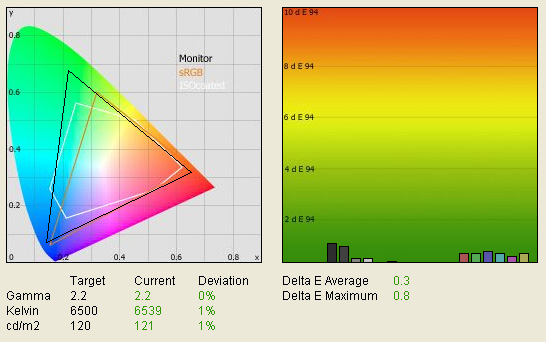
Followed your link... you've got a PVA panel not a S-IPS, so limited what it can do there... Anyway, I thought I'd compare their tests on your monitors vs the one I use at home, looking at colour rather than contrast (PVA and S-IPS are intrinsically different at contrast)... charts are after calibration, as "out of the box" settings are always wacky, as we both agree!
What this clearly shows, is that two monitors can display quite fundamentally different amounts of colour. A bog-standard monitor would be far worse than either, of course...
Samsung 971p :

Hazro 30w :

Still shooting in the dark (literally and metaphorically)...
Posted 08/01/2011 - 15:14
Link
OK Flossie, I understand what your saying. Your Hazro looks nice
but it's a step or two up from Samsung also a lot bigger.
I actually bought the Samsung because I liked the stand and
the the computer is in the living room so I wanted something
that looked smart I also didn't want widescreen which
restricted my choice quite a bit.
but it's a step or two up from Samsung also a lot bigger.
I actually bought the Samsung because I liked the stand and
the the computer is in the living room so I wanted something
that looked smart I also didn't want widescreen which
restricted my choice quite a bit.
Half Man... Half Pentax ... Half Cucumber
Pentax K-1 + K-5 and some other stuff
Algi
Pentax K-1 + K-5 and some other stuff
Algi
Add Comment
To leave a comment - Log in to Pentax User or create a new account.




4839 posts
19 years
South West London
Did you use Argyll with Huey or just the Huey software?
If anyone's interested, it works fine with Windows 7, both 32 bit and 64 bit.
Pentax K-3, DA18-135, DA35 F2.4, DA17-70, DA55-300, FA28-200, A50 F1.7, A100 F4 Macro, A400 F5.6, Sigma 10-20 EXDC, 50-500 F4.5-6.3 APO DG OS Samsung flash SEF-54PZF(x2)
.