USB Storage with DSLR

Posted 25/06/2009 - 17:58
Link
Anvh wrote:
I went over the usual news page and I saw this.
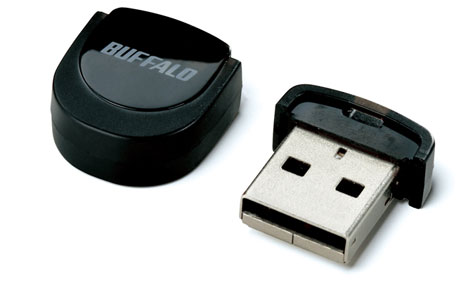
Alright that is a new USB stick by Buffalo and it's 16GB!
So I thought, it would be great if you could connect a usb storage device to the camera and that the camera could transport the photos on the SD-card to the USB device.
Not very handy while shooting of course but with vacations you're a week or more from home and such simple feature should be perfect to copy the photos you made and store them on a cheap USB-stick or external hard-drive instead of using multiple SD-cards or using a laptop.
I think this is very feasible for a DSLR to do these days, they are already half a computer.
Do someone know if this is already be done... maybe I should pantent the idea
Hi Stefan,I went over the usual news page and I saw this.

Alright that is a new USB stick by Buffalo and it's 16GB!
So I thought, it would be great if you could connect a usb storage device to the camera and that the camera could transport the photos on the SD-card to the USB device.
Not very handy while shooting of course but with vacations you're a week or more from home and such simple feature should be perfect to copy the photos you made and store them on a cheap USB-stick or external hard-drive instead of using multiple SD-cards or using a laptop.
I think this is very feasible for a DSLR to do these days, they are already half a computer.
Do someone know if this is already be done... maybe I should pantent the idea
As there is no facility to connect the SD card to the USB port, I don't think that it's feasible.
Sorry, but you will have to use a dongle and a laptop on your holidays, or like me, load up with a 16 Gig SDHC card!
(32 Gig cards are now available, from the 7 Day shop)
Peter

Posted 25/06/2009 - 18:23
Link
Peter, he means connect a USB stick to the camera! Then move files over from the SD card to the USB stick via the camera.
Sounds like a brilliantly simple idea to me, maybe an idea for an additional feature for the grip where there is more room to add it?
Only trouble is, that looks too easy to lose!
Sounds like a brilliantly simple idea to me, maybe an idea for an additional feature for the grip where there is more room to add it?
Only trouble is, that looks too easy to lose!

Posted 25/06/2009 - 18:38
Link
I didn't say that Peter.
I was talking about connecting a USB device to the DSLR not a SD-card to a USB stick
Like Danny said
So you use the DSLR as the interface that transports the photos/video from the SD-card to the USB device.
You connect the DSLR to your computer by USB so the Connection is there but not yet the interface to let everything work.
The Sandisk Extreme III 8GB is £43.99 so £5,50 per 1GB
Dane-Elec So Mobile 500GB is £72.99 so £0.15 per 1GB
So that's why for long storage an USB device is much better then a SD card.
I was talking about connecting a USB device to the DSLR not a SD-card to a USB stick
Like Danny said
So you use the DSLR as the interface that transports the photos/video from the SD-card to the USB device.
You connect the DSLR to your computer by USB so the Connection is there but not yet the interface to let everything work.
The Sandisk Extreme III 8GB is £43.99 so £5,50 per 1GB
Dane-Elec So Mobile 500GB is £72.99 so £0.15 per 1GB
So that's why for long storage an USB device is much better then a SD card.
Stefan

K10D, K5
DA* 16-50, DA* 50-135, D-FA 100 Macro, DA 40 Ltd, DA 18-55
AF-540FGZ

K10D, K5
DA* 16-50, DA* 50-135, D-FA 100 Macro, DA 40 Ltd, DA 18-55
AF-540FGZ
Posted 25/06/2009 - 18:41
Link
Unlocker wrote:
Sounds like a brilliantly simple idea to me, maybe an idea for an additional feature for the grip where there is more room to add it?
Only trouble is, that looks too easy to lose!
Like I said above the DSLR connects to the PC with USB so a special cord instead of a Male USB a Female USB at the end should do the trick.Sounds like a brilliantly simple idea to me, maybe an idea for an additional feature for the grip where there is more room to add it?
Only trouble is, that looks too easy to lose!
Then of course you need to have an USB interface software on the DSLR but that doesn't seem like a big deal.
External USB drives also works with the USB interface to my knowledge and those are cheap and easy, they are also bigger so you won't loose them so easily.
This is the cable but instead of Male-USB connector a Female-USB so that you can plug in a USB device in that.

Stefan
K10D, K5
DA* 16-50, DA* 50-135, D-FA 100 Macro, DA 40 Ltd, DA 18-55
AF-540FGZ
K10D, K5
DA* 16-50, DA* 50-135, D-FA 100 Macro, DA 40 Ltd, DA 18-55
AF-540FGZ

Posted 25/06/2009 - 19:36
Link
It would be extremely useful if the camera could upload directly to a hard drive.
I expect the camera manufacturers don't yet think it's worth building enough extra computing power into the cameras to allow this.
I expect the camera manufacturers don't yet think it's worth building enough extra computing power into the cameras to allow this.
~Pete
Posted 25/06/2009 - 20:04
Link
iceblinker wrote:
It would be extremely useful if the camera could upload directly to a hard drive.
I expect the camera manufacturers don't yet think it's worth building enough extra computing power into the cameras to allow this.
The camera can already read and write those files so only USB interface support is needed and some programs line to enable to copy the files to your USB stick and nothing more.It would be extremely useful if the camera could upload directly to a hard drive.
I expect the camera manufacturers don't yet think it's worth building enough extra computing power into the cameras to allow this.
Computing power don't look like a problem here.
If you connect the camera to the PC and let it be recognized as camera instead of storage-device, the camera reads the data I believe and gives it to the pc. I can be wrong with this though since I'm speculating.
ps. to be honest I find my idea more usefull then the ability to make HDR with the camera
That would have cost a lot more time I believe.
Stefan
K10D, K5
DA* 16-50, DA* 50-135, D-FA 100 Macro, DA 40 Ltd, DA 18-55
AF-540FGZ
K10D, K5
DA* 16-50, DA* 50-135, D-FA 100 Macro, DA 40 Ltd, DA 18-55
AF-540FGZ

Posted 25/06/2009 - 20:12
Link
The one that baffles me is why I can't get a reader that will allow me to copy my SD cards directly to my iPod. I've got loads of free space and I don't want to view the pictures, just use the hard drive.
They had a similar product years ago but it's off the market now.
They had a similar product years ago but it's off the market now.
Posted 25/06/2009 - 20:40
Link
Might be because Apple is so protective of their little baby, also software made for it is under their full control.
Got a HTC touch myself with tweaked os on it and it is running very well.
Have played with the Iphone but liked the smaller size and the better screen of the HTC and that I'm able to use the software I want.
Got a HTC touch myself with tweaked os on it and it is running very well.
Have played with the Iphone but liked the smaller size and the better screen of the HTC and that I'm able to use the software I want.
Stefan
K10D, K5
DA* 16-50, DA* 50-135, D-FA 100 Macro, DA 40 Ltd, DA 18-55
AF-540FGZ
K10D, K5
DA* 16-50, DA* 50-135, D-FA 100 Macro, DA 40 Ltd, DA 18-55
AF-540FGZ

Posted 25/06/2009 - 21:06
Link
Anvh wrote:
Might be because Apple is so protective of their little baby, also software made for it is under their full control.
Got a HTC touch myself with tweaked os on it and it is running very well.
Have played with the Iphone but liked the smaller size and the better screen of the HTC and that I'm able to use the software I want.
Want to know a bit more about that, Stefan. I have the HTC Touch Diamond 2Might be because Apple is so protective of their little baby, also software made for it is under their full control.
Got a HTC touch myself with tweaked os on it and it is running very well.
Have played with the Iphone but liked the smaller size and the better screen of the HTC and that I'm able to use the software I want.
since a week or two, so curious about the os tweaking and usability as a external HD
Martin.
Posted 25/06/2009 - 21:29
Link
Sorry Martin for the missunderstanding it doesn't work with an external HD. Was simply comparing the Iphone with the HTC.
Lovely screen right, with the resolution.
The tweaked software can be found here if you don't mind english OS.
link
Everything is made and tweaked by forum mebers so everything is free and on your own risk!
The ROM is the os part, you probable need to "cook" (link) your phone to accept unofficial OS
Here is a list of tweaked roms link
Lovely screen right, with the resolution.
The tweaked software can be found here if you don't mind english OS.
link
Everything is made and tweaked by forum mebers so everything is free and on your own risk!
The ROM is the os part, you probable need to "cook" (link) your phone to accept unofficial OS
Here is a list of tweaked roms link
Stefan
K10D, K5
DA* 16-50, DA* 50-135, D-FA 100 Macro, DA 40 Ltd, DA 18-55
AF-540FGZ
K10D, K5
DA* 16-50, DA* 50-135, D-FA 100 Macro, DA 40 Ltd, DA 18-55
AF-540FGZ
Posted 25/06/2009 - 21:37
Link
Will have a look at it. Thanks !
Martin.
Martin.
Posted 25/06/2009 - 22:12
Link
Anvh wrote:
The camera can already read and write those files so only USB interface support is needed and some programs line to enable to copy the files to your USB stick and nothing more.
Computing power don't look like a problem here.
I suspect it's more complicated than you think to write to a hard drive via USB. There aren't many devices apart from computers that do it. There has got to be a good reason for that.The camera can already read and write those files so only USB interface support is needed and some programs line to enable to copy the files to your USB stick and nothing more.
Computing power don't look like a problem here.
You can't plug an ordinary hard drive directly into an ordinary router, for example - a device that has a certain amount of computing power built in (but not enough). Instead you need a NAS (or similar) drive that virtually has its own computer.
Yes it's already done the other way round with the camera, but that's using the power of your PC to read stuff off the memory card.
By the way, a USB stick wouldn't be any advantage over buying extra SD cards unless it was much larger than 16GB. Direct hard drive support certainly would be useful though.
~Pete
Posted 25/06/2009 - 22:30
Link
Thing is Pete, the camera is a computer.
It has the capacity to write files from one memory source (the buffer) to external storage devices that are formatted in the same way as hard drives are (i.e FAT32), it's just that the storage device is an SD card, and the connections for it happen to be inside the camera. There is no reason at all why that data couldn't be sent down the USB connection to another storage device. The fact that the camera can write to SD cards means that it is capable.
We know that the camera can read data from the SD card, or it could never do firmware updates or review pictures!
We know the camera can send the files quickly down it's integrated USB2 connection.
We know the camera can handle the FAT 32 file system.
Therefore, it would literally be a case of implementing some firmware to do it. USB sticks would make more sense than hard drives from a power consumption point of view, and they do (expensively I know) go up to 128GB.
There is no technical reason that it could not be currently done at all, but there could be other reasons why it would never happen. One of the reasons that the European K-7 will have a 25 min video recording limit, is that beyond that, it would be classed as a camcorder and incur an additional import duty which I'm sure I read was 10-12%
It has the capacity to write files from one memory source (the buffer) to external storage devices that are formatted in the same way as hard drives are (i.e FAT32), it's just that the storage device is an SD card, and the connections for it happen to be inside the camera. There is no reason at all why that data couldn't be sent down the USB connection to another storage device. The fact that the camera can write to SD cards means that it is capable.
We know that the camera can read data from the SD card, or it could never do firmware updates or review pictures!
We know the camera can send the files quickly down it's integrated USB2 connection.
We know the camera can handle the FAT 32 file system.
Therefore, it would literally be a case of implementing some firmware to do it. USB sticks would make more sense than hard drives from a power consumption point of view, and they do (expensively I know) go up to 128GB.
There is no technical reason that it could not be currently done at all, but there could be other reasons why it would never happen. One of the reasons that the European K-7 will have a 25 min video recording limit, is that beyond that, it would be classed as a camcorder and incur an additional import duty which I'm sure I read was 10-12%
Posted 25/06/2009 - 22:43
Link
I know the camera is a computer. The question is whether it is a powerful enough computer to deal with a hard drive via USB, and how much extra firmware would be required. Firmware takes memory.
I think one needs to know the specifics of hard drives and USB interfaces to know that, rather than assuming it's possible because certain other things are possible. I don't know that specific info.
2.5" portable hard drives are more affordable than high-capacity memory sticks. I wouldn't mind carrying a separate power supply if one was needed. The combination would still be much more portable than a laptop or netbook thing.
I think one needs to know the specifics of hard drives and USB interfaces to know that, rather than assuming it's possible because certain other things are possible. I don't know that specific info.
2.5" portable hard drives are more affordable than high-capacity memory sticks. I wouldn't mind carrying a separate power supply if one was needed. The combination would still be much more portable than a laptop or netbook thing.
~Pete
Add Comment
To leave a comment - Log in to Pentax User or create a new account.




10412 posts
18 years
Dordrecht,
the Netherlands
Alright that is a new USB stick by Buffalo and it's 16GB!
So I thought, it would be great if you could connect a usb storage device to the camera and that the camera could transport the photos on the SD-card to the USB device.
Not very handy while shooting of course but with vacations you're a week or more from home and such simple feature should be perfect to copy the photos you made and store them on a cheap USB-stick or external hard-drive instead of using multiple SD-cards or using a laptop.
I think this is very feasible for a DSLR to do these days, they are already half a computer.
Do someone know if this is already be done... maybe I should pantent the idea
K10D, K5
DA* 16-50, DA* 50-135, D-FA 100 Macro, DA 40 Ltd, DA 18-55
AF-540FGZ