setting sharpness in K7

Posted 05/09/2012 - 00:15
Link
If you look in the Index of your Operating Manual you will find Sharpness. I can't be more specific as I use the K-5 and it may or may not be exactly the same as your K-7.
Best regards, John

Posted 05/09/2012 - 01:06
Link
johnriley wrote:
If you look in the Index of your Operating Manual you will find Sharpness. I can't be more specific as I use the K-5 and it may or may not be exactly the same as your K-7.
They were not quite specific about this, however I did find the solution. I have to thit the controller at the 3 o'clock position. This brings up eight different modes and on each mode one can offset the defaults, including sharpness from soft to hard. Somewhere along the line someone (me) must have set the system to an item that takes soft focusing. If you look in the Index of your Operating Manual you will find Sharpness. I can't be more specific as I use the K-5 and it may or may not be exactly the same as your K-7.
One issue I have not been able to resolve however with this k7, is how to get the skies more blue, as compared to my fuji or canon cameras, and none of those are SLR's. However I shoot landscapes in RAW, for the most part, so one can always adjust later. Two of my friends just bought the K5 and are very happy with their purchases.
Thanks for the prompt reply.

Posted 05/09/2012 - 07:21
Link
I think the majority of use "never read the manual" we are too impatient to get out there shooting.
Posted 05/09/2012 - 08:19
Link
Quote:
how to get the skies more blue
Pentax Colour tends to be quite realistic and some other marques over-exaggerate, so you may need to set your camera to Vivid to get what you want. However, this only applies to JPEG capture, so it might be an idea to give JPEG a try with all picture styles to see what suits.
how to get the skies more blue
Best regards, John

Posted 05/09/2012 - 09:33
Link
I use a K-7 most of the day, I can't find the sharpness settings, looked when set to jpg and still nowt. So sorry OP I'm no use ;O)
One day you'll find, 10yrs have got behind you.

Posted 05/09/2012 - 09:56
Link
Hi,
I keep a pdf copy of the K7 mnaual locally, from Page 205 and 206 of the pdf:
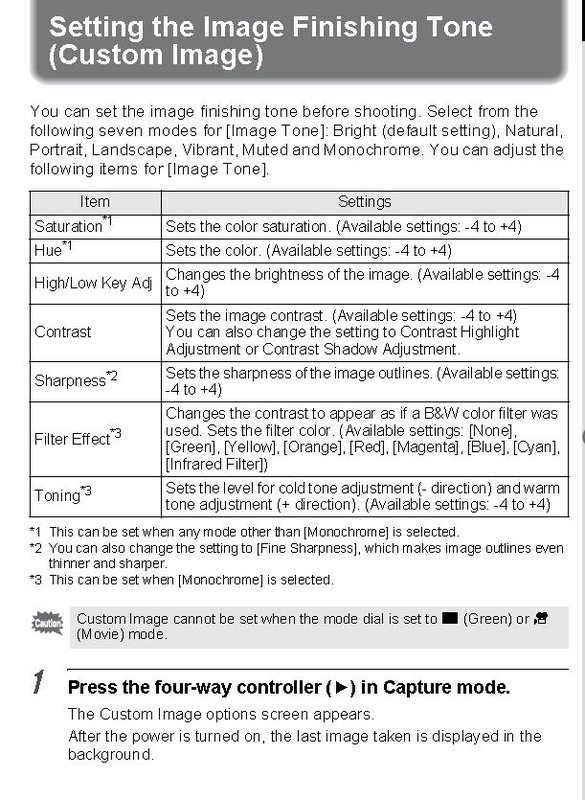

HI,
I keep a pdf copy of the K7 mnaual locally, from Page 205 and 206 of the pdf:


HI,
Posted 05/09/2012 - 10:22
Link
Aahhh a place I never visit!
One day you'll find, 10yrs have got behind you.

Posted 05/09/2012 - 16:25
Link
Come on then all, lets pull out those little booklets and start studying.
I actually do rather enjoy reading instructions, but I accept I will forever remain in a minority. I bought a very good guide book to the K7, the Magic Lantern Guide by Peter Burian, and I thoroughly recommend it - it puts the settings into a practical context, and gives working examples of why you might choose one particular option over another (such as what might be the effect of linking AE-L to the active focus point, or not, - something I had not spent much time pondering previously).
But it helped brilliantly (to me, completely new to DSLRs and Pentax)to quickly get my camera set up for manual lenses, and many other usability features.
I actually do rather enjoy reading instructions, but I accept I will forever remain in a minority. I bought a very good guide book to the K7, the Magic Lantern Guide by Peter Burian, and I thoroughly recommend it - it puts the settings into a practical context, and gives working examples of why you might choose one particular option over another (such as what might be the effect of linking AE-L to the active focus point, or not, - something I had not spent much time pondering previously).
But it helped brilliantly (to me, completely new to DSLRs and Pentax)to quickly get my camera set up for manual lenses, and many other usability features.
My Guides to the Pentax Digital Camera Flash Lighting System : Download here from the PentaxForums Homepage Article .... link
Pentax K7 with BG-4 Grip / Samyang 14mm f2.8 ED AS IF UMC / DA18-55mm f3.5-5.6 AL WR / SMC A28mm f2.8 / D FA 28-105mm / SMC F35-70 f3.5-4.5 / SMC A50mm f1.7 / Tamron AF70-300mm f4-5.6 Di LD macro / SMC M75-150mm f4.0 / Tamron Adaptall (CT-135) 135mm f2.8 / Asahi Takumar-A 2X tele-converter / Pentax AF-540FGZ (I & II) Flashes / Cactus RF60/X Flashes & V6/V6II Transceiver
Pentax K7 with BG-4 Grip / Samyang 14mm f2.8 ED AS IF UMC / DA18-55mm f3.5-5.6 AL WR / SMC A28mm f2.8 / D FA 28-105mm / SMC F35-70 f3.5-4.5 / SMC A50mm f1.7 / Tamron AF70-300mm f4-5.6 Di LD macro / SMC M75-150mm f4.0 / Tamron Adaptall (CT-135) 135mm f2.8 / Asahi Takumar-A 2X tele-converter / Pentax AF-540FGZ (I & II) Flashes / Cactus RF60/X Flashes & V6/V6II Transceiver

Posted 07/09/2012 - 11:05
Link
almierau wrote:
One issue I have not been able to resolve however with this k7, is how to get the skies more blue, as compared to my fuji or canon cameras, and none of those are SLR's. However I shoot landscapes in RAW, for the most part, so one can always adjust later. Two of my friends just bought the K5 and are very happy with their purchases.
I have found a circular polarser very effective is raising the level of blue in skys.
One issue I have not been able to resolve however with this k7, is how to get the skies more blue, as compared to my fuji or canon cameras, and none of those are SLR's. However I shoot landscapes in RAW, for the most part, so one can always adjust later. Two of my friends just bought the K5 and are very happy with their purchases.
Bodies: K5IIs, K7, MZ5n, LX, MV
Lenses: DA*16-50, DA18-55WR, DA18-135, DAL35, M50 F2, A50 f1.4, FA50 f1.4, DA*50-135, DA55-300, Tamron 70-300, DFA 100 WR Macro, M135 f3.5, Sigma 120-400 APO DG HSM, Tokina 500 f8.0
Flash: Metz 58, Metz 48
Accessories: BG4, Pentax right angle finder, Pentax mirror adaptor lens, O-ME53 Viewfinder Loupe
Auto 110 System: Auto 110, Winder, 18mm, 24mm, 50mm, 70mm, 20-40mm, AF100P, 1.7x telecon
Lenses: DA*16-50, DA18-55WR, DA18-135, DAL35, M50 F2, A50 f1.4, FA50 f1.4, DA*50-135, DA55-300, Tamron 70-300, DFA 100 WR Macro, M135 f3.5, Sigma 120-400 APO DG HSM, Tokina 500 f8.0
Flash: Metz 58, Metz 48
Accessories: BG4, Pentax right angle finder, Pentax mirror adaptor lens, O-ME53 Viewfinder Loupe
Auto 110 System: Auto 110, Winder, 18mm, 24mm, 50mm, 70mm, 20-40mm, AF100P, 1.7x telecon

Posted 07/09/2012 - 17:49
Link
When using a DSLR there are only two rules.
1. get a manual lens and learn how to use it by...
2. RTFM
over and over and over trying out everything it offers and settling on what you like best.
1. get a manual lens and learn how to use it by...
2. RTFM
over and over and over trying out everything it offers and settling on what you like best.
Flickr
"Life is what happens to you while you're busy making other plans" (John Lennon)
"Life is what happens to you while you're busy making other plans" (John Lennon)
Posted 07/09/2012 - 18:03
Link
SteveEveritt wrote:
When using a DSLR there are only two rules.
1. get a manual lens and learn how to use it by...
2. RTFM
over and over and over trying out everything it offers and settling on what you like best.
When I had my K10, I skipped most of the manual and read the Magic Lantern guide, made notes or had my camera in front of me. That way I ensured I understood all the settings and tried things out. It was invaliuable.
When using a DSLR there are only two rules.
1. get a manual lens and learn how to use it by...
2. RTFM
over and over and over trying out everything it offers and settling on what you like best.
Bodies: K5IIs, K7, MZ5n, LX, MV
Lenses: DA*16-50, DA18-55WR, DA18-135, DAL35, M50 F2, A50 f1.4, FA50 f1.4, DA*50-135, DA55-300, Tamron 70-300, DFA 100 WR Macro, M135 f3.5, Sigma 120-400 APO DG HSM, Tokina 500 f8.0
Flash: Metz 58, Metz 48
Accessories: BG4, Pentax right angle finder, Pentax mirror adaptor lens, O-ME53 Viewfinder Loupe
Auto 110 System: Auto 110, Winder, 18mm, 24mm, 50mm, 70mm, 20-40mm, AF100P, 1.7x telecon
Lenses: DA*16-50, DA18-55WR, DA18-135, DAL35, M50 F2, A50 f1.4, FA50 f1.4, DA*50-135, DA55-300, Tamron 70-300, DFA 100 WR Macro, M135 f3.5, Sigma 120-400 APO DG HSM, Tokina 500 f8.0
Flash: Metz 58, Metz 48
Accessories: BG4, Pentax right angle finder, Pentax mirror adaptor lens, O-ME53 Viewfinder Loupe
Auto 110 System: Auto 110, Winder, 18mm, 24mm, 50mm, 70mm, 20-40mm, AF100P, 1.7x telecon
Posted 08/09/2012 - 09:09
Link
It is a pleasure to see a discussion about camera settings, without the typical put-down of disparaging comments such as, "Why are you bothering with those settings - are you not shooting Raw?". I am still learning about them, but I suspect there are many who have learnt to use the extensive in-camera settings, who are pleased with the Jpeg output from their Pentax cameras, and who have discovered that (if necessary) they still have plenty of leeway for adjustment in PP, to produce high quality photos when viewed at normal print/screen size (e.g. typically A3 or A4).
Philip
Philip
Posted 08/09/2012 - 19:14
Link
Yes, if you are shooting JPEGs only it does make sense to take command with these in camera settings. Our Pentax DSLRs, in addition to a wide range of preset 'Custom Image' modes, also have a great deal of individual tweaking sliders for finer control.
But, I look at it this way - the 'native' format for digital cameras is RAW (specific to each camera), so any output from the camera that we use to view, print etc is actually a 'conversion', and if we make any changes to exposure, WB, contrast, saturation etc, then we are 'editing' also.
This applies to outputting a 'conversion' or 'edit' directly from the camera or from a computer. The key differences I think come down to ease of use, efficiency and the degree of finer control we can exert. In my view, these aspects are all superior on a computer with various software deployed. Do I think you can get a higher quality image this way than on JPEG from the camera ? Yes, I believe in all situations the potential for this is there in RAW with computer editing.
Interestingly, I have recently taken a great interest in the Custom Images settings - not applied in camera, but using the Pentax Digital Camera Utility software. It has become my first 'conversion' step in my workflow. Why ? Because I think the quality of edits it applys is very high, and the fine control exceptional.
I think (for example) the white balance fine controls produce the best results that I have seen, and the Highlights Correction feature (as seen in Silkypix) is very sophisticated (you can control the degree of Saturation or hue that is pulled back into clipped highlights).
And you have additional controls for the available lens distortion and chromatic abberation corrections (auto and manual controls). Output to 16bit TIFF and you can carry on in another editor if needed.
But, I look at it this way - the 'native' format for digital cameras is RAW (specific to each camera), so any output from the camera that we use to view, print etc is actually a 'conversion', and if we make any changes to exposure, WB, contrast, saturation etc, then we are 'editing' also.
This applies to outputting a 'conversion' or 'edit' directly from the camera or from a computer. The key differences I think come down to ease of use, efficiency and the degree of finer control we can exert. In my view, these aspects are all superior on a computer with various software deployed. Do I think you can get a higher quality image this way than on JPEG from the camera ? Yes, I believe in all situations the potential for this is there in RAW with computer editing.
Interestingly, I have recently taken a great interest in the Custom Images settings - not applied in camera, but using the Pentax Digital Camera Utility software. It has become my first 'conversion' step in my workflow. Why ? Because I think the quality of edits it applys is very high, and the fine control exceptional.
I think (for example) the white balance fine controls produce the best results that I have seen, and the Highlights Correction feature (as seen in Silkypix) is very sophisticated (you can control the degree of Saturation or hue that is pulled back into clipped highlights).
And you have additional controls for the available lens distortion and chromatic abberation corrections (auto and manual controls). Output to 16bit TIFF and you can carry on in another editor if needed.
My Guides to the Pentax Digital Camera Flash Lighting System : Download here from the PentaxForums Homepage Article .... link
Pentax K7 with BG-4 Grip / Samyang 14mm f2.8 ED AS IF UMC / DA18-55mm f3.5-5.6 AL WR / SMC A28mm f2.8 / D FA 28-105mm / SMC F35-70 f3.5-4.5 / SMC A50mm f1.7 / Tamron AF70-300mm f4-5.6 Di LD macro / SMC M75-150mm f4.0 / Tamron Adaptall (CT-135) 135mm f2.8 / Asahi Takumar-A 2X tele-converter / Pentax AF-540FGZ (I & II) Flashes / Cactus RF60/X Flashes & V6/V6II Transceiver
Pentax K7 with BG-4 Grip / Samyang 14mm f2.8 ED AS IF UMC / DA18-55mm f3.5-5.6 AL WR / SMC A28mm f2.8 / D FA 28-105mm / SMC F35-70 f3.5-4.5 / SMC A50mm f1.7 / Tamron AF70-300mm f4-5.6 Di LD macro / SMC M75-150mm f4.0 / Tamron Adaptall (CT-135) 135mm f2.8 / Asahi Takumar-A 2X tele-converter / Pentax AF-540FGZ (I & II) Flashes / Cactus RF60/X Flashes & V6/V6II Transceiver
Add Comment
To leave a comment - Log in to Pentax User or create a new account.




50 posts
18 years
Saskatoon,
Saskatchewan