Pentax Image Sync (iPhone - App)

Posted 03/11/2016 - 13:48
Link
Screen shots of the app interfaces look similar.
Flucard

Image Sync
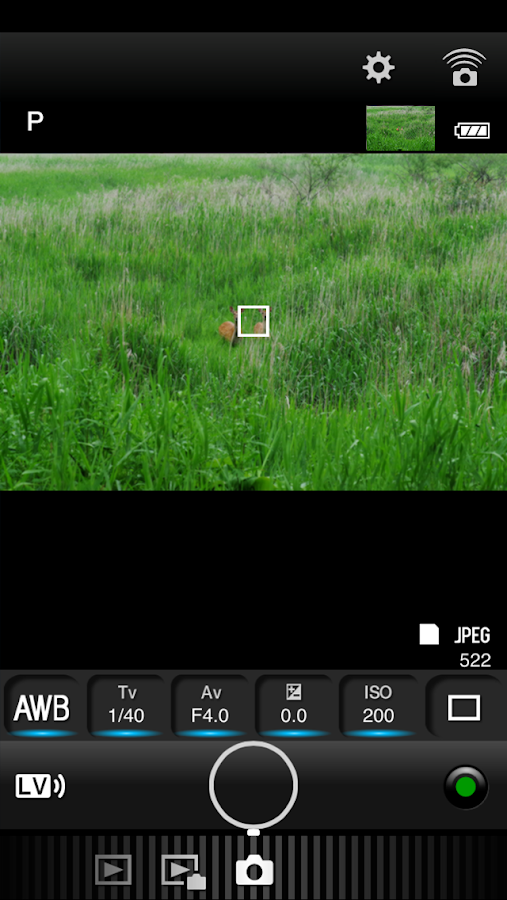
I think the main difference is Image Sync has the software in the app whereas it appears the Flucard software is accessed as a web page from the card (I haven't got one but that's how the product page makes it appear.)
http://www.ricoh-imaging.co.uk/en/misc/Flucard-Pentax-16GB-O-FC1.html
https://play.google.com/store/apps/details?id=com.ricohimaging.imagesync&hl=en_G...
Definitely the two products are quite different, despite superficial similarities and discussing both as if they are same makes for confusing reading.
Flucard

Image Sync
I think the main difference is Image Sync has the software in the app whereas it appears the Flucard software is accessed as a web page from the card (I haven't got one but that's how the product page makes it appear.)
http://www.ricoh-imaging.co.uk/en/misc/Flucard-Pentax-16GB-O-FC1.html
https://play.google.com/store/apps/details?id=com.ricohimaging.imagesync&hl=en_G...
Definitely the two products are quite different, despite superficial similarities and discussing both as if they are same makes for confusing reading.
John K

Posted 01/06/2017 - 09:23
Link
Hi, I own a Pentax 645Z and am currently trying to connect my iPad to the Pentax through a FluCard Pro and the Pentax app 'Image Sync'. The card's WiFi shows up in the WiFi choice of the iPad it connects but....the app shows a 'not connected' icon and stays inert. I downloaded a free 'FluCard DL HD' app which in all its simplicity enables me to view and download pictures (JPEG or DNG) from the card to the iPad. So the connection is there but the app doesn't allow me the hoped for functions like live view and remote. I noted that in the Pentax' menu (Wireless Memory Card / Firmware Info/Options) it shows: Firmware version 00.01.00.01 Contents Version 00.01.00.02
Anybody?
Anybody?
Posted 01/06/2017 - 11:00
Link
If you read back through this thread you may detect that Image Sync is an app designed for Pentax's recent cameras with Wi-Fi built in. These cameras are:
K-1
KP
K70
K-S2
Ricoh GRII
Ricoh WG-M23
it won't work with any others at this time (June 2017).
The older Wi-Fi method was the Flucard and Image Sync is not compatible with that. Setting up a Flucard is more comparable to setting up a Theta 360.
The Flucard software is built into the card and should work with any compatible Pentax including the K-3. As to other compatible cameras I can't find a list anywhere! Anyhow, this page describes how to set it:
https://www.pentaxforums.com/reviews/pentax-flucard-o-fc1-review/flucard-setup-g...
In summary you need to network your phone to FLUCARD_for_PENTAX.
I'm surprised at how many computer literate people keep getting Image Sync and Flucard for Pentax mixed up. They are completely independent of each other. Or is it Pentax forgot to include an instruction sheet with the Flucard?
K-1
KP
K70
K-S2
Ricoh GRII
Ricoh WG-M23
it won't work with any others at this time (June 2017).
The older Wi-Fi method was the Flucard and Image Sync is not compatible with that. Setting up a Flucard is more comparable to setting up a Theta 360.
The Flucard software is built into the card and should work with any compatible Pentax including the K-3. As to other compatible cameras I can't find a list anywhere! Anyhow, this page describes how to set it:
https://www.pentaxforums.com/reviews/pentax-flucard-o-fc1-review/flucard-setup-g...
In summary you need to network your phone to FLUCARD_for_PENTAX.
I'm surprised at how many computer literate people keep getting Image Sync and Flucard for Pentax mixed up. They are completely independent of each other. Or is it Pentax forgot to include an instruction sheet with the Flucard?
John K
Posted 01/06/2017 - 11:15
Link
Morning,
Only just noticed this thread and it's actually what I'm trying to work out for myself or swap systems as ideally I need wireless (or wired) tethering that works in a studio(portraits) and outdoors (property/interiors).
Does anybody have any experience with the Flucard at all and how reliable/fast it is?
K
Only just noticed this thread and it's actually what I'm trying to work out for myself or swap systems as ideally I need wireless (or wired) tethering that works in a studio(portraits) and outdoors (property/interiors).
Does anybody have any experience with the Flucard at all and how reliable/fast it is?
K
Posted 01/06/2017 - 11:28
Link
JohnX wrote:
That would have meant incorporating the html software in the camera rather than require a separate app. Agreed, it would have been better and may actually have worked correctly which (for me) Image Sync still doesn't - still no liveview feed.
JAK wrote:
And still the confusion reigns!
Not for me, just annoyance that Ricoh haven't included Flucard based control in their Image Sync app.And still the confusion reigns!
John K
Posted 01/06/2017 - 11:29
Link
Kamis wrote:
Morning,
Only just noticed this thread and it's actually what I'm trying to work out for myself or swap systems as ideally I need wireless (or wired) tethering that works in a studio(portraits) and outdoors (property/interiors).
Does anybody have any experience with the Flucard at all and how reliable/fast it is?
K
With which camera?
Morning,
Only just noticed this thread and it's actually what I'm trying to work out for myself or swap systems as ideally I need wireless (or wired) tethering that works in a studio(portraits) and outdoors (property/interiors).
Does anybody have any experience with the Flucard at all and how reliable/fast it is?
K
John K
Posted 01/06/2017 - 11:49
Link
JAK wrote:
The Flucard software is built into the card and should work with any compatible Pentax including the K-3. As to other compatible cameras I can't find a list anywhere!
Reading further suggests that Pentax's Flucard is only fully compatible with the K-3. There may be limited functionality with the K-50 and K5ii according to forum and review postings. Perhaps others may wish to share their success with other models. Could it, for instance, be used as an alternative to Image Sync on the K-1 and KP where the liveview feed doesn't come through?
The Flucard software is built into the card and should work with any compatible Pentax including the K-3. As to other compatible cameras I can't find a list anywhere!
John K

Posted 01/06/2017 - 12:10
Link
Sorry, I probably should have mentioned! Currently have a K5 but thinking of going either K3, K1 or swapping over to 6D or D750.
K
K
Posted 01/06/2017 - 12:29
Link
K5: Flucard probably not compatible unless someone knows otherwise.
K-3 : The flucard was designed to work with this.
K-1, KP, K70, K-S2: These have built in wi-fi which requires the Image Sync app on Android or Apple (not PC) so doubt it would suit though maybe OK if sideloaded into a Kindle tablet (can't see why that wouldn't work) but I've not got it working as it should on a standard Android phone. As I think you know, for PC use they're happy to sell you the Image Transmitter CD for a mere £200 !
K-3 : The flucard was designed to work with this.
K-1, KP, K70, K-S2: These have built in wi-fi which requires the Image Sync app on Android or Apple (not PC) so doubt it would suit though maybe OK if sideloaded into a Kindle tablet (can't see why that wouldn't work) but I've not got it working as it should on a standard Android phone. As I think you know, for PC use they're happy to sell you the Image Transmitter CD for a mere £200 !
John K
Posted 01/06/2017 - 13:27
Link
@JAK Thanks for this, really helps out. Re Pentax and their Image Transmitter...let me just whip out the spare £200 that I have stashed in my camera backpack so I can find out if it works or not! Surely they should have offered it for free to begin with!
So to get a properly working tether, I need a K-1 and their IT2. Hmmm
K
So to get a properly working tether, I need a K-1 and their IT2. Hmmm
K
Posted 01/06/2017 - 14:26
Link
£159 https://www.cliftoncameras.co.uk/Pentax-Image-Transmitter-2-Software?gclid=CN6d2...
or £149 from SRS
http://www.ebay.co.uk/itm/Pentax-Image-Transmitter-for-645D-/192088273257?hash=i...
or £149 from SRS
http://www.ebay.co.uk/itm/Pentax-Image-Transmitter-for-645D-/192088273257?hash=i...
John K
Add Comment
To leave a comment - Log in to Pentax User or create a new account.




2470 posts
17 years
South London
And still the confusion reigns!