My thoughts on the K30 and K3 for video

Posted 23/12/2014 - 01:53
Link
Almost the same as I have the K-01 and K-50 set up.


Posted 23/12/2014 - 07:24
Link
widezu69 wrote:
The audio is ok but there is a lot of hissing in the audio at whatever recording level so I have resorted to recording loud and turning down in post reducing the overall volume which compensates for some of the hissing.
You risk clipping the audio doing this, which is unrecoverable, akin to blown highlights in picture terms. The K-30 at least doesn't given any visual indication of the audio levels being received, so you're completely in the dark as to what the volume/audio gain should be set at to avoid clipping or losing the audio down in the hiss.The audio is ok but there is a lot of hissing in the audio at whatever recording level so I have resorted to recording loud and turning down in post reducing the overall volume which compensates for some of the hissing.
widezu69 wrote:
The camera's video low ight performance is pretty bad though and I tend to avoid shooting video above 800 iso which means I have to be wide open and at 1/30 for 1080p30. I would much rather be at 1/60 or even 1/100. It sufficed but in dark indoors the issues really showed.
The camera's video low ight performance is pretty bad though and I tend to avoid shooting video above 800 iso which means I have to be wide open and at 1/30 for 1080p30. I would much rather be at 1/60 or even 1/100. It sufficed but in dark indoors the issues really showed.
Yep, Pentax don't offer much of a solution for low light video. The codec and bit rate is simply too low to allow for anything that can potentially be worked on in post production once light levels fall too long. I have found the video disappointingly narrow to work on in post, with little leeway up or down unfortunately. You simply have to get it right in camera as much as possible, which goes for anything really in general.
Disappointingly this (low light ability) was one of the main points picked up on the 645Z video mode, which had such potential with that massive sensor.
What is your final output frame rate and resolution? If you're after that filmic look, then you'd be targeting 24p, shot at a shutter speed of 1/50s You can play with this obviously, but it's a fairly well adhered to guideline. 24p also will give you slightly better low light ability than 30fps, that's mostly why I mention this.
You haven't mentioned stabilisation, specifically 'Movie SR' on these newer models you are reviewing. I think, in my humble opinion, that that's a good move (not to mention it), and it's also a good move to leave it permanently turned off. Quickly, it's warps the crap out of your footage, (in a non linear fashion, which means it's impossible to correct this in post). And this is highly disappointing, given this was potentially a massive point of difference over other brands, which you end up turning off...
Normally this would have been followed by a but I've since come to terms with the fact that there is no firmware fix coming for this (would have been oh so easy to have given an option in the menu) and zen like I've moved on

Posted 23/12/2014 - 08:23
Link
Haven't done much video but would like to do more - thanks for the above tips and a couple of questions -
What software do you guys use for post production?
How does altering shutter speed affect things?
Thanks
Jez
What software do you guys use for post production?
How does altering shutter speed affect things?
Thanks
Jez
Posted 23/12/2014 - 09:15
Link
jemx99 wrote:
What software do you guys use for post production?
I use Adobe Premiere CS6.What software do you guys use for post production?
It's a very professional product, with a learning curve like photoshop I guess.
I can't comment on any others.
jemx99 wrote:
How does altering shutter speed affect things?
Exactly the same as stills.How does altering shutter speed affect things?
Eg how long the shutter is open for, which controls the amount of light the sensor receives, and the motion blur in the shot.
The difference though is that the blur of motion contributes to the feel of the video. Very crisp/sharp/no motion photos played back at 'movie' speeds look down right weird, so you are actually after some blur of motion.
Fundamentally though, full HD video is just 24 or 30 2MP stills played back one after another each second. All the normal stills concepts of composition and exposure etc relate to each of those photos. These photos are very much jpg equivalents with Pentax as they offer no RAW type offering in video mode.
Posted 23/12/2014 - 10:36
Link
richandfleur wrote:
It's a very professional product, with a learning curve like photoshop I guess.
I can't comment on any others.
Eg how long the shutter is open for, which controls the amount of light the sensor receives, and the motion blur in the shot.
The difference though is that the blur of motion contributes to the feel of the video. Very crisp/sharp/no motion photos played back at 'movie' speeds look down right weird, so you are actually after some blur of motion.
Fundamentally though, full HD video is just 24 or 30 2MP stills played back one after another each second. All the normal stills concepts of composition and exposure etc relate to each of those photos. These photos are very much jpg equivalents with Pentax as they offer no RAW type offering in video mode.
Many thanks.jemx99 wrote:
What software do you guys use for post production?
I use Adobe Premiere CS6.What software do you guys use for post production?
It's a very professional product, with a learning curve like photoshop I guess.
I can't comment on any others.
jemx99 wrote:
How does altering shutter speed affect things?
Exactly the same as stills.How does altering shutter speed affect things?
Eg how long the shutter is open for, which controls the amount of light the sensor receives, and the motion blur in the shot.
The difference though is that the blur of motion contributes to the feel of the video. Very crisp/sharp/no motion photos played back at 'movie' speeds look down right weird, so you are actually after some blur of motion.
Fundamentally though, full HD video is just 24 or 30 2MP stills played back one after another each second. All the normal stills concepts of composition and exposure etc relate to each of those photos. These photos are very much jpg equivalents with Pentax as they offer no RAW type offering in video mode.
Jez

Posted 23/12/2014 - 11:02
Link
richandfleur wrote:
You risk clipping the audio doing this, which is unrecoverable, akin to blown highlights in picture terms. The K-30 at least doesn't given any visual indication of the audio levels being received, so you're completely in the dark as to what the volume/audio gain should be set at to avoid clipping or losing the audio down in the hiss.
Yes of course I am aware of this and I should have made things more clear, I haven't run into audio clipping issues yet simply because it seems I am recording fairly quiet subjects but yes, one must keep a ear out for possible audio clipping.You risk clipping the audio doing this, which is unrecoverable, akin to blown highlights in picture terms. The K-30 at least doesn't given any visual indication of the audio levels being received, so you're completely in the dark as to what the volume/audio gain should be set at to avoid clipping or losing the audio down in the hiss.
richandfleur wrote:
What is your final output frame rate and resolution? If you're after that filmic look, then you'd be targeting 24p, shot at a shutter speed of 1/50s You can play with this obviously, but it's a fairly well adhered to guideline. 24p also will give you slightly better low light ability than 30fps, that's mostly why I mention this.
I usually go for 24p or 30p and so I aim for 1/50 or 1/60 respectively. Most of the time this is quite hard to achieve in the dark but I have more and more begun to shoot at higher shutter speeds in the bright because I feel like the sub 1/100 speeds have too much blur for my liking. This is a personal thing.What is your final output frame rate and resolution? If you're after that filmic look, then you'd be targeting 24p, shot at a shutter speed of 1/50s You can play with this obviously, but it's a fairly well adhered to guideline. 24p also will give you slightly better low light ability than 30fps, that's mostly why I mention this.
richandfleur wrote:
You haven't mentioned stabilisation, specifically 'Movie SR' on these newer models you are reviewing. I think, in my humble opinion, that that's a good move (not to mention it), and it's also a good move to leave it permanently turned off. Quickly, it's warps the crap out of your footage, (in a non linear fashion, which means it's impossible to correct this in post). And this is highly disappointing, given this was potentially a massive point of difference over other brands, which you end up turning off...
I agree, the Movie SR is fairly useless. There is too much warping going on. When I stuck my K30 on a tripod and filmed an interview, the SR then began to think that head-bob was shake and I could visible see the frame shifting up and down when my subject was talking! Movie SR is only useful when one is filming a landscape on a tripod and there may be some wind interference. Otherwise leave it off. I have yet to try the SR in the K3 but I'm sure it will be a similar affair.You haven't mentioned stabilisation, specifically 'Movie SR' on these newer models you are reviewing. I think, in my humble opinion, that that's a good move (not to mention it), and it's also a good move to leave it permanently turned off. Quickly, it's warps the crap out of your footage, (in a non linear fashion, which means it's impossible to correct this in post). And this is highly disappointing, given this was potentially a massive point of difference over other brands, which you end up turning off...
richandfleur wrote:
Normally this would have been followed by a but I've since come to terms with the fact that there is no firmware fix coming for this (would have been oh so easy to have given an option in the menu) and zen like I've moved on
Its difficult but I think the codec has improved in the K3. The K30 can't even playback the K3 movie files so there definitely is a difference, hopefully for the better. I will load the clips into Davinci Resolve for a play around later
Normally this would have been followed by a but I've since come to terms with the fact that there is no firmware fix coming for this (would have been oh so easy to have given an option in the menu) and zen like I've moved on
Posted 23/12/2014 - 12:08
Link
widezu69 wrote:
I agree, the Movie SR is fairly useless. There is too much warping going on. When I stuck my K30 on a tripod and filmed an interview, the SR then began to think that head-bob was shake and I could visible see the frame shifting up and down when my subject was talking! Movie SR is only useful when one is filming a landscape on a tripod and there may be some wind interference. Otherwise leave it off. I have yet to try the SR in the K3 but I'm sure it will be a similar affair.
Normally they say that S/R shouldn't be used when on a tripod, but I know what you mean.I agree, the Movie SR is fairly useless. There is too much warping going on. When I stuck my K30 on a tripod and filmed an interview, the SR then began to think that head-bob was shake and I could visible see the frame shifting up and down when my subject was talking! Movie SR is only useful when one is filming a landscape on a tripod and there may be some wind interference. Otherwise leave it off. I have yet to try the SR in the K3 but I'm sure it will be a similar affair.
With Movie SR it only seems to be visual queues that are used to determine if shake reduction needs to be applied.
I have heard also that the live view display is stabilised mechanically, it's all rather confusing as to why they didn't keep the K-5 family approach to video SR, and some responses conflict. Most recently Pentax have openly blamed noise, so possibly the coding in the newer K-30/K-3 processors types responded differently etc?
Either way, keep it off for anything really important, and stabilise in post for more control. 2.7k resolutions would really help in this respect.

Posted 23/12/2014 - 14:42
Link
my opinion is
if you want to do video buy a dam video camera thats what they are made for and a slr is for stills
enough said rant over
if you want to do video buy a dam video camera thats what they are made for and a slr is for stills
enough said rant over

Posted 23/12/2014 - 14:52
Link
I can see the attraction of using a DSLR for video, with all the creative possibilities of using various lenses and the quality potential of a relatively huge sensor.
I use compact cameras sometimes for this, perhaps at a concert or party, but that's never a "serious" shoot. I did use Super 8 film for a very short while, but soon discovered that to make it worthwhile I would need to make movies properly. Script, shooting schedule, actors.....gartmore knows much more about all of this than I do.......but that requires a lot of creative investment.
Otherwise, we just end up with boring moving pictures, in the same way that slide shows of holiday snaps were boring in the days of film. I applaud anybody who can invest the time in it and make it good.
I use compact cameras sometimes for this, perhaps at a concert or party, but that's never a "serious" shoot. I did use Super 8 film for a very short while, but soon discovered that to make it worthwhile I would need to make movies properly. Script, shooting schedule, actors.....gartmore knows much more about all of this than I do.......but that requires a lot of creative investment.
Otherwise, we just end up with boring moving pictures, in the same way that slide shows of holiday snaps were boring in the days of film. I applaud anybody who can invest the time in it and make it good.
Best regards, John
Posted 23/12/2014 - 14:54
Link
I've never used the video function on any of my DSLRs, I wish Pentax would release two versions of each camera one with video and one without for £100 cheaper
Posted 23/12/2014 - 15:12
Link
mille19 wrote:
I've never used the video function on any of my DSLRs, I wish Pentax would release two versions of each camera one with video and one without for £100 cheaper
im with you on that one mille19
I've never used the video function on any of my DSLRs, I wish Pentax would release two versions of each camera one with video and one without for £100 cheaper

Posted 23/12/2014 - 15:14
Link
Forget it ... its not going to happen. The market simply demands quality HD video now in any serious camera. Pentax would be rubbished if they removed it, and frankly the production costs of building two side by side models would outweigh any savings of not having video features. In fact, I think its been argued that the video functionalities add very little real cost to making the cameras.
There's no way you guys are going to save £100 by getting a camera without video.
There's no way you guys are going to save £100 by getting a camera without video.
My Guides to the Pentax Digital Camera Flash Lighting System : Download here from the PentaxForums Homepage Article .... link
Pentax K7 with BG-4 Grip / Samyang 14mm f2.8 ED AS IF UMC / DA18-55mm f3.5-5.6 AL WR / SMC A28mm f2.8 / D FA 28-105mm / SMC F35-70 f3.5-4.5 / SMC A50mm f1.7 / Tamron AF70-300mm f4-5.6 Di LD macro / SMC M75-150mm f4.0 / Tamron Adaptall (CT-135) 135mm f2.8 / Asahi Takumar-A 2X tele-converter / Pentax AF-540FGZ (I & II) Flashes / Cactus RF60/X Flashes & V6/V6II Transceiver
Pentax K7 with BG-4 Grip / Samyang 14mm f2.8 ED AS IF UMC / DA18-55mm f3.5-5.6 AL WR / SMC A28mm f2.8 / D FA 28-105mm / SMC F35-70 f3.5-4.5 / SMC A50mm f1.7 / Tamron AF70-300mm f4-5.6 Di LD macro / SMC M75-150mm f4.0 / Tamron Adaptall (CT-135) 135mm f2.8 / Asahi Takumar-A 2X tele-converter / Pentax AF-540FGZ (I & II) Flashes / Cactus RF60/X Flashes & V6/V6II Transceiver
Posted 23/12/2014 - 15:23
Link
What makes more sense would be a customisable video function button ... I mean one switch that's dedicated, by default, to quickly activating video mode (useful for those who switch between photos and videos), but allow the switch to be customised for a variety of other functions (eg, switching between two pre-defined focus point arrays, or AA filter simulator on/off, or spot/matrix metering switching) ... the kind of things that every photographer might choose as an option. This way the hardwear is being paid for, but actually used, by everyone.
My Guides to the Pentax Digital Camera Flash Lighting System : Download here from the PentaxForums Homepage Article .... link
Pentax K7 with BG-4 Grip / Samyang 14mm f2.8 ED AS IF UMC / DA18-55mm f3.5-5.6 AL WR / SMC A28mm f2.8 / D FA 28-105mm / SMC F35-70 f3.5-4.5 / SMC A50mm f1.7 / Tamron AF70-300mm f4-5.6 Di LD macro / SMC M75-150mm f4.0 / Tamron Adaptall (CT-135) 135mm f2.8 / Asahi Takumar-A 2X tele-converter / Pentax AF-540FGZ (I & II) Flashes / Cactus RF60/X Flashes & V6/V6II Transceiver
Pentax K7 with BG-4 Grip / Samyang 14mm f2.8 ED AS IF UMC / DA18-55mm f3.5-5.6 AL WR / SMC A28mm f2.8 / D FA 28-105mm / SMC F35-70 f3.5-4.5 / SMC A50mm f1.7 / Tamron AF70-300mm f4-5.6 Di LD macro / SMC M75-150mm f4.0 / Tamron Adaptall (CT-135) 135mm f2.8 / Asahi Takumar-A 2X tele-converter / Pentax AF-540FGZ (I & II) Flashes / Cactus RF60/X Flashes & V6/V6II Transceiver
Add Comment
To leave a comment - Log in to Pentax User or create a new account.




83 posts
16 years
I will put samples up in due time.
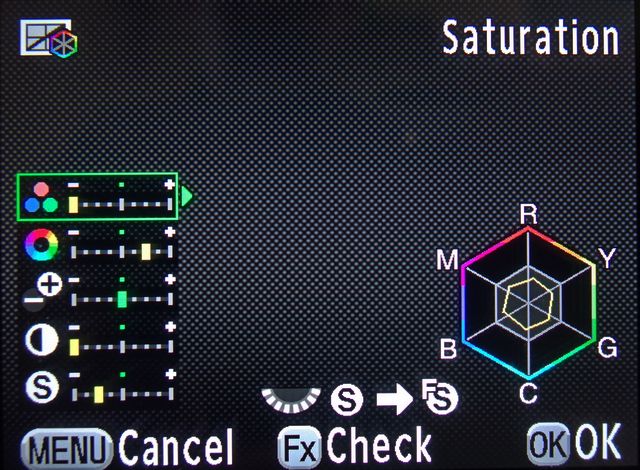
Pentax was never great for video. Initially shooting on the K30 without much knowledge and experience I basically used the Natural picture profile with the sharpening cranked to full. This resulted in a whole bunch of ringing and amplified the aliasing artefacts as well as blown whites and blacks. I then learnt a bit more about colour grading in post and how pro cameras have a flat profile to take advantage of dynamic range. This got me thinking of attempting to flatten out the image on the K30. On the muted profile I have everything on the lowest setting apart from saturation which is one from lowest and key adjust is on the highest. Because the resulting gamma is quite high I had to expose lower but the picture was much better. Highlights and shadow detail were more easily recovered and there is more you can do with the image in post.
The camera's video low ight performance is pretty bad though and I tend to avoid shooting video above 800 iso which means I have to be wide open and at 1/30 for 1080p30. I would much rather be at 1/60 or even 1/100. It sufficed but in dark indoors the issues really showed.
Audio was another issue. The pre-amps are pretty bad. The audio is ok but there is a lot of hissing in the audio at whatever recording level so I have resorted to recording loud and turning down in post reducing the overall volume which compensates for some of the hissing.
Enter the K3. I love this camera for the stills. Amazing picture quality at up to 16000 iso. To me the only camera that beats this is the 7d mark II but only in speed, autofocus and maybe noise. K3 is king for dynamic range which is what got me excited about this camera's video.
The camera has the same picture profiles as the K30 plus more options. When customising the picture profiles, a turn of the front dial enables some control over the highlight and shadows so naturally I turned the highlights all the way down and the shadows all the way up and this does give a really flat image when coupled with the other muted settings from the K30. It's still not Log or FLT flat but it is an improvement and works well in post. For those who are unfamiliar, this will give you an extremely dull and lifeless image but can be more easily recovered in software for best effect.
Video recording is also streamlined as you can customise it to record to your second card. There is no more hissing in the audio and the image noise is improved over the K30. I would probably be ok shooting at video at 1600 iso. I will definitely be attaching a Rode mic on this with the added mic port and headphone monitoring Jack.
With the sharpness turned all the way down in the picture profiles the camera doesn't apply any aggressive sharpening and yes the image is soft on both cameras but I think it is slightly better on the K3 and sharpening in post using a more robust software filter is always better.
So for all you out there who want to try shooting video and have some grading experience, try my recommended settings for better colour response. In summary when shooting video on the K3 try using the muted profile with everything turned down except the saturation which should be at one from lowest. Key adjust at the highest, turn the front dial to reveal highlight and shadow controls and flatten them out. Expose 0.7 stops under or dial it into the exposure comp if you are using a auto or semi-auto mode. Will post videos demonstrating the differences