Lightroom 4 AND Photoshop?

Posted 11/12/2012 - 22:28
Link
johnriley wrote:
I think that looks very similar to me Alan. This is what we get if we open a RAW file in CS5:

The extra adjustments are on tabs above the sliders area. It seems exactly the same sort of layout to me, it just opens as a large dialog box within the image area odf Photoshop.
Lightroom's develop module is pretty much exactly the same as ACR's paramters, plus some extras.I think that looks very similar to me Alan. This is what we get if we open a RAW file in CS5:

The extra adjustments are on tabs above the sliders area. It seems exactly the same sort of layout to me, it just opens as a large dialog box within the image area odf Photoshop.
Download the demo and try and you'll get the picture --
[i]Bodies: 1x K-5IIs, 2x K-5, Sony TX-5, Nokia 808
Lenses: Pentax DA 10-17mm ED(IF) Fish Eye, Pentax DA 14mm f/2.8, Sigma 17-70mm f/2.8, Pentax-A 28mm f/2.8, Sigma 30mm F1.4 EX DC, Pentax-A 50mm f/1.2, Pentax-A 50mm f/1.4, Pentax-FA 50mm f/1.4, Pentax-A 50mm f/1.7, Pentax DA* 50-135mm f/2.8, Sigma 135-400mm APO DG, and more ..
Flash: AF-540FGZ, Vivitar 283
Lenses: Pentax DA 10-17mm ED(IF) Fish Eye, Pentax DA 14mm f/2.8, Sigma 17-70mm f/2.8, Pentax-A 28mm f/2.8, Sigma 30mm F1.4 EX DC, Pentax-A 50mm f/1.2, Pentax-A 50mm f/1.4, Pentax-FA 50mm f/1.4, Pentax-A 50mm f/1.7, Pentax DA* 50-135mm f/2.8, Sigma 135-400mm APO DG, and more ..
Flash: AF-540FGZ, Vivitar 283

Posted 11/12/2012 - 23:01
Link
McGregNi wrote:
Try opening ACR (by selecting a RAW file) - the current ACR version number is printed in the top left corner of the ACR window (as in the screenshot above). As I emphasised earlier, the Elements version will have fewer of the tabs on the right hand side, so fewer of the more sophisticated or multi step adjustment options. It wll have the 'Basic' section (with the key single-slider parameters, and then a noise reduction tab etc.
One useful tip - on the bar labled 'basic' there is a tiny right pointing arow on the right end - click here and a dropdown will offer a few choices to compare the current settings with the unedited version, and a couple of others I think - useful for seeing how your changes have affected the overall shot as you go.
I allways have it in full screen,so have never seen it before.Try opening ACR (by selecting a RAW file) - the current ACR version number is printed in the top left corner of the ACR window (as in the screenshot above). As I emphasised earlier, the Elements version will have fewer of the tabs on the right hand side, so fewer of the more sophisticated or multi step adjustment options. It wll have the 'Basic' section (with the key single-slider parameters, and then a noise reduction tab etc.
One useful tip - on the bar labled 'basic' there is a tiny right pointing arow on the right end - click here and a dropdown will offer a few choices to compare the current settings with the unedited version, and a couple of others I think - useful for seeing how your changes have affected the overall shot as you go.
I says CAMERA RAW 6.7 PENTAX K-30.
Cheers
Dave

Posted 11/12/2012 - 23:09
Link
Mannesty wrote:
Thanks.FAT8BIKER wrote:
... It says CAMERA RAW 6.7 PENTAX K-30.
ACR 6.7 is the latest version that will work with Photoshop Elements version 10.... It says CAMERA RAW 6.7 PENTAX K-30.
Cheers
Dave

Posted 12/12/2012 - 21:19
Link
Lightroom has what it calls develop presets. You can save any combination of settings and importantly choose which parameters to save in the preset. For example you could create a Debelop preset that only contains a contrast and exposure compensation setting. This means the develop preset won't overright the values of any other parameters.
I have several Develop Presets which I apply to various types of shots before editing on a more detailed level. For example my landscape preset has an upper grad filter with increased contrast For the sky, and a lower grad filter with an exposure boost and a bit of clarity for the land. I'll simply select all the pics in the shoot that have land and relatively unobscured sky, and apply this preset to them all. Only then will I start editing any favourites.
Another great feature of lightroom is that you can write your own plugins for it, to automate tasks. I've written a plugin that applies a certain amount of sharpening and noise reduction based upon the camera and the ISO.
So before exporting a shoot, I simply select them all and apply this plugin. saves a ridiculous amount of time. And applying sharpening and noise reduction at the end of editing means that lightroom works much speedier During the editing process
I have several Develop Presets which I apply to various types of shots before editing on a more detailed level. For example my landscape preset has an upper grad filter with increased contrast For the sky, and a lower grad filter with an exposure boost and a bit of clarity for the land. I'll simply select all the pics in the shoot that have land and relatively unobscured sky, and apply this preset to them all. Only then will I start editing any favourites.
Another great feature of lightroom is that you can write your own plugins for it, to automate tasks. I've written a plugin that applies a certain amount of sharpening and noise reduction based upon the camera and the ISO.
So before exporting a shoot, I simply select them all and apply this plugin. saves a ridiculous amount of time. And applying sharpening and noise reduction at the end of editing means that lightroom works much speedier During the editing process
[i]Bodies: 1x K-5IIs, 2x K-5, Sony TX-5, Nokia 808
Lenses: Pentax DA 10-17mm ED(IF) Fish Eye, Pentax DA 14mm f/2.8, Sigma 17-70mm f/2.8, Pentax-A 28mm f/2.8, Sigma 30mm F1.4 EX DC, Pentax-A 50mm f/1.2, Pentax-A 50mm f/1.4, Pentax-FA 50mm f/1.4, Pentax-A 50mm f/1.7, Pentax DA* 50-135mm f/2.8, Sigma 135-400mm APO DG, and more ..
Flash: AF-540FGZ, Vivitar 283
Lenses: Pentax DA 10-17mm ED(IF) Fish Eye, Pentax DA 14mm f/2.8, Sigma 17-70mm f/2.8, Pentax-A 28mm f/2.8, Sigma 30mm F1.4 EX DC, Pentax-A 50mm f/1.2, Pentax-A 50mm f/1.4, Pentax-FA 50mm f/1.4, Pentax-A 50mm f/1.7, Pentax DA* 50-135mm f/2.8, Sigma 135-400mm APO DG, and more ..
Flash: AF-540FGZ, Vivitar 283

Posted 12/12/2012 - 22:50
Link
Quote:
Another great feature of lightroom is that you can write your own plugins for it, to automate tasks
To do this in Photoshop, we create an Action. It sounds like the same thing - a series of actions saved and available at the click of a button.
Another great feature of lightroom is that you can write your own plugins for it, to automate tasks
Best regards, John
Posted 12/12/2012 - 23:51
Link
johnriley wrote:
Plugins are more than just recording a series of actions. but code in their own right The equivalent in Photoshop would Photoshop Plugins. Quote:
Another great feature of lightroom is that you can write your own plugins for it, to automate tasks
To do this in Photoshop, we create an Action. It sounds like the same thing - a series of actions saved and available at the click of a button.Another great feature of lightroom is that you can write your own plugins for it, to automate tasks
http://www.adobe.com/devnet/photoshop.html
Lightroom plugins are written in the LUA programming language. http://www.lua.org/docs.html
I would assume photoshop uses the same ....
ETA: Looks like Photoshop plugins are written in C++
according to this
http://stackoverflow.com/questions/272575/how-do-i-rewrite-adobe-photoshop-plugi...
I did delve into C programming years ago. LUA isn't difficult though. the Lightroom SDK provides most functions pre complied so writing ilghtroom plugs ain't too laborious
[i]Bodies: 1x K-5IIs, 2x K-5, Sony TX-5, Nokia 808
Lenses: Pentax DA 10-17mm ED(IF) Fish Eye, Pentax DA 14mm f/2.8, Sigma 17-70mm f/2.8, Pentax-A 28mm f/2.8, Sigma 30mm F1.4 EX DC, Pentax-A 50mm f/1.2, Pentax-A 50mm f/1.4, Pentax-FA 50mm f/1.4, Pentax-A 50mm f/1.7, Pentax DA* 50-135mm f/2.8, Sigma 135-400mm APO DG, and more ..
Flash: AF-540FGZ, Vivitar 283
Lenses: Pentax DA 10-17mm ED(IF) Fish Eye, Pentax DA 14mm f/2.8, Sigma 17-70mm f/2.8, Pentax-A 28mm f/2.8, Sigma 30mm F1.4 EX DC, Pentax-A 50mm f/1.2, Pentax-A 50mm f/1.4, Pentax-FA 50mm f/1.4, Pentax-A 50mm f/1.7, Pentax DA* 50-135mm f/2.8, Sigma 135-400mm APO DG, and more ..
Flash: AF-540FGZ, Vivitar 283

Posted 13/12/2012 - 21:44
Link
SO WHY PHOTOSHOP AFTER LIGHTROOM. YES I AM SHOUTING
Posted 14/12/2012 - 06:02 - Helpful Comment
Link
SlightlySoiled wrote:
SO WHY PHOTOSHOP AFTER LIGHTROOM. YES I AM SHOUTING
Calm down dear! SO WHY PHOTOSHOP AFTER LIGHTROOM. YES I AM SHOUTING
Simple answer, Photoshop has some image manipulation capabilities that Lightroom does not.
Lightroom is an image development tool. Photoshop is a graphical creation/editing tool.
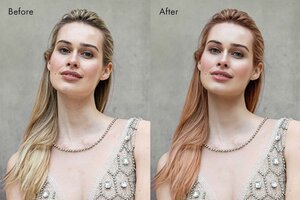
EG: Lightroom lacks the 'warping' tools to give models a virtual tummy tuck, wider/thinner nose, less pointed chin etc.
Yes, we can remove skin blemishes in Lightroom, but if you need to change the apparent physical dimensions of a particular subject, or even just replace the sky in an otherwise perfect landscape shot, you need Photoshop.
I would love to see these, and other photography related tools, in Lightroom, but I think Photoshop CS/Elements sales would suffer too badly for Adobe to consider doing it.
If Adobe would port all of their Photoshop based image manipulation tools into Lightroom, IMHO it would make all other image editing software redundant, Lightroom sales would go through the roof and Photoshop sales would fall through the floor because there are a lot more digital photographers on the planet now than there are graphical designers.
Peter E Smith - flickr Photostream

Posted 14/12/2012 - 12:54
Link
I have to say it's what you are used to seems the easiest if not the best, even though it may not be. I tried Lightroom but while I could see all the good features it seemed a nightmare just to open 1 file and edit and save it. It wants to open catalogues and there is no normal "save as" as such although I found out why and how.
Photoshop for me.
Photoshop for me.
Posted 14/12/2012 - 14:32
Link
dcweather wrote:
... I tried Lightroom but while I could see all the good features it seemed a nightmare just to open 1 file and edit and save it.
In Lightroom, you don't 'save' anything. An image is imported into its catalogue and any changes you make are stored as you make them, the original file is not changed in any way, so it doesn't need to be saved.... I tried Lightroom but while I could see all the good features it seemed a nightmare just to open 1 file and edit and save it.
You can revisit an image years later and undo the adjustments you made, and start again if you wish. You can't do that with a saved JPG/TIFF unless you keep the original as well.
Also, if you are happy with the adjustments you've made to one image, and you have many similar images, you can apply those changes to all of those other similar images. A job that is not so easy with a sved JPG/TIFF.
Peter E Smith - flickr Photostream
Posted 14/12/2012 - 14:36
Link
Mannesty wrote:
Simple answer, Photoshop has some image manipulation capabilities that Lightroom does not.
Lightroom is an image development tool. Photoshop is a graphical creation/editing tool.
EG: Lightroom lacks the 'warping' tools to give models a virtual tummy tuck, wider/thinner nose, less pointed chin etc.
Yes, we can remove skin blemishes in Lightroom, but if you need to change the apparent physical dimensions of a particular subject, or even just replace the sky in an otherwise perfect landscape shot, you need Photoshop.
I would love to see these, and other photography related tools, in Lightroom, but I think Photoshop CS/Elements sales would suffer too badly for Adobe to consider doing it.
If Adobe would port all of their Photoshop based image manipulation tools into Lightroom, IMHO it would make all other image editing software redundant, Lightroom sales would go through the roof and Photoshop sales would fall through the floor because there are a lot more digital photographers on the planet now than there are graphical designers.
I don't agree. SlightlySoiled wrote:
SO WHY PHOTOSHOP AFTER LIGHTROOM. YES I AM SHOUTING
Calm down dear! SO WHY PHOTOSHOP AFTER LIGHTROOM. YES I AM SHOUTING
Simple answer, Photoshop has some image manipulation capabilities that Lightroom does not.
Lightroom is an image development tool. Photoshop is a graphical creation/editing tool.
EG: Lightroom lacks the 'warping' tools to give models a virtual tummy tuck, wider/thinner nose, less pointed chin etc.
Yes, we can remove skin blemishes in Lightroom, but if you need to change the apparent physical dimensions of a particular subject, or even just replace the sky in an otherwise perfect landscape shot, you need Photoshop.
I would love to see these, and other photography related tools, in Lightroom, but I think Photoshop CS/Elements sales would suffer too badly for Adobe to consider doing it.
If Adobe would port all of their Photoshop based image manipulation tools into Lightroom, IMHO it would make all other image editing software redundant, Lightroom sales would go through the roof and Photoshop sales would fall through the floor because there are a lot more digital photographers on the planet now than there are graphical designers.
Lightroom is fine for 95% of all General photography editing, While Photoshop is the big pro image editing application that can do all the celeb fakery and other image manipulation stuff.
Merging the two wouldn't mean LR's sales would go through the roof it would mean sales would plummet as most people wouldn't spend the increased amount of money on it.
Your business model is a akin to having only expensive DSLRs that can do everything. The compact/phone cam market wouldn't go and buy them.
[i]Bodies: 1x K-5IIs, 2x K-5, Sony TX-5, Nokia 808
Lenses: Pentax DA 10-17mm ED(IF) Fish Eye, Pentax DA 14mm f/2.8, Sigma 17-70mm f/2.8, Pentax-A 28mm f/2.8, Sigma 30mm F1.4 EX DC, Pentax-A 50mm f/1.2, Pentax-A 50mm f/1.4, Pentax-FA 50mm f/1.4, Pentax-A 50mm f/1.7, Pentax DA* 50-135mm f/2.8, Sigma 135-400mm APO DG, and more ..
Flash: AF-540FGZ, Vivitar 283
Lenses: Pentax DA 10-17mm ED(IF) Fish Eye, Pentax DA 14mm f/2.8, Sigma 17-70mm f/2.8, Pentax-A 28mm f/2.8, Sigma 30mm F1.4 EX DC, Pentax-A 50mm f/1.2, Pentax-A 50mm f/1.4, Pentax-FA 50mm f/1.4, Pentax-A 50mm f/1.7, Pentax DA* 50-135mm f/2.8, Sigma 135-400mm APO DG, and more ..
Flash: AF-540FGZ, Vivitar 283
Add Comment
To leave a comment - Log in to Pentax User or create a new account.


5986 posts
14 years
Surrey,
England
One useful tip - on the bar labled 'basic' there is a tiny right pointing arow on the right end - click here and a dropdown will offer a few choices to compare the current settings with the unedited version, and a couple of others I think - useful for seeing how your changes have affected the overall shot as you go.
Pentax K7 with BG-4 Grip / Samyang 14mm f2.8 ED AS IF UMC / DA18-55mm f3.5-5.6 AL WR / SMC A28mm f2.8 / D FA 28-105mm / SMC F35-70 f3.5-4.5 / SMC A50mm f1.7 / Tamron AF70-300mm f4-5.6 Di LD macro / SMC M75-150mm f4.0 / Tamron Adaptall (CT-135) 135mm f2.8 / Asahi Takumar-A 2X tele-converter / Pentax AF-540FGZ (I & II) Flashes / Cactus RF60/X Flashes & V6/V6II Transceiver