lightroom, photoshop...or something else?

Posted 13/05/2015 - 22:12
Link
Elements is all I ever use. It's very powerful and now it has Layers, you can do so much. I haven't missed the full version of Photoshop at all.
For special effects the free offer of PerfectEffects 9 currently on Ephotozine is brilliant. Highly recommended.
For special effects the free offer of PerfectEffects 9 currently on Ephotozine is brilliant. Highly recommended.
Best wishes,
Andrew
"These places mean something and it's the job of a photographer to figure-out what the hell it is."
Robert Adams
"The camera doesn't make a bit of difference. All of them can record what you are seeing. But, you have to SEE."
Ernst Hass
My website: http://www.ephotozine.com/user/bwlchmawr-199050
http://s927.photobucket.com/home/ADC3440/index
https://www.flickr.com/photos/78898196@N05
Andrew
"These places mean something and it's the job of a photographer to figure-out what the hell it is."
Robert Adams
"The camera doesn't make a bit of difference. All of them can record what you are seeing. But, you have to SEE."
Ernst Hass
My website: http://www.ephotozine.com/user/bwlchmawr-199050
http://s927.photobucket.com/home/ADC3440/index
https://www.flickr.com/photos/78898196@N05

Posted 13/05/2015 - 22:16
Link
I've now used Serif of Nottingham's Photoplus for about ten years. It does pretty well everything the others do with about £30 being the upgrade price every year or so.
X7 is the fully featured current version with a nice RAW and Jpeg studio. link
I also create web pages with Webplus (integrates with Photoplus) , documents with Pageplus and graphic vectors with DrawPlus. There is a MoviePlus if that's your thing.
X7 is the fully featured current version with a nice RAW and Jpeg studio. link
I also create web pages with Webplus (integrates with Photoplus) , documents with Pageplus and graphic vectors with DrawPlus. There is a MoviePlus if that's your thing.

Posted 13/05/2015 - 22:35
Link
McGregNi wrote:
I'd say the latest versions of Elements editing features are more aligned in interface and functional terms to the full Photoshop, but strip out some aspects not core to photography, or that relate to commercial printing .
Thanks Nigel,I'd say the latest versions of Elements editing features are more aligned in interface and functional terms to the full Photoshop, but strip out some aspects not core to photography, or that relate to commercial printing .
I'm not up with the play on it so good to know.
Lightroom offers no layers option , although it tends to incorporate these directly in brushes if you're talking adjustment layers.
That's the difference though, in that Lightroom only tries to mimic the original Darkroom process of film development. If you are seriously manipulating your photos, creating composites etc then Lightroom can't do that.
Agree elements may therefore be better initially, or the combo of Lightroom and Photoshop. Perhaps start with Lightroom and see if you need photoshop?
Agree Kris that you need both, but with HDR and Pano's now being in Lightroom, the need to jump out is steadily reducing.

Posted 14/05/2015 - 07:01
Link
It really depends what you want to do and what you've trained yourself to do so far.
Learning new software from Adobe in particular is always a challenge. I'd definitely stay away from the 'Elements' family. Lightroom is best for RAW and even JPG to a point. It can even enhance/colour grade and trim video.
My personal favourite for quick edits/crops/enhancements is FASTSTONE. This little freebie is really fast and powerful.
Opening a RAW file in FS first opens the embeded JPG which for many purposes is all you might need (email/web/facebook etc) The actual RAW is opened by pressing the 'A' key after it's loaded the embedded JPG. But I don't use FS for RAW preferring instead to use Lightroom.
I don't use the cataloging features of Lightroom as I have my own management methods which don't tie me down to one particular software (a leasson I learned back in the Picasa days - arrgh)..
So yeh, I recommend FASTSTONE first for every day management and editing, Lightroom for the heavy lifting with RAW and run a mile if someone offers you any of the Elements family.
Photoshop is just overkill for a newbie.
Learning new software from Adobe in particular is always a challenge. I'd definitely stay away from the 'Elements' family. Lightroom is best for RAW and even JPG to a point. It can even enhance/colour grade and trim video.
My personal favourite for quick edits/crops/enhancements is FASTSTONE. This little freebie is really fast and powerful.
Opening a RAW file in FS first opens the embeded JPG which for many purposes is all you might need (email/web/facebook etc) The actual RAW is opened by pressing the 'A' key after it's loaded the embedded JPG. But I don't use FS for RAW preferring instead to use Lightroom.
I don't use the cataloging features of Lightroom as I have my own management methods which don't tie me down to one particular software (a leasson I learned back in the Picasa days - arrgh)..
So yeh, I recommend FASTSTONE first for every day management and editing, Lightroom for the heavy lifting with RAW and run a mile if someone offers you any of the Elements family.
Photoshop is just overkill for a newbie.

Posted 14/05/2015 - 09:04
Link
Steve, you don't say what in particular you dislike about PS Elements ... ?
My Guides to the Pentax Digital Camera Flash Lighting System : Download here from the PentaxForums Homepage Article .... link
Pentax K7 with BG-4 Grip / Samyang 14mm f2.8 ED AS IF UMC / DA18-55mm f3.5-5.6 AL WR / SMC A28mm f2.8 / D FA 28-105mm / SMC F35-70 f3.5-4.5 / SMC A50mm f1.7 / Tamron AF70-300mm f4-5.6 Di LD macro / SMC M75-150mm f4.0 / Tamron Adaptall (CT-135) 135mm f2.8 / Asahi Takumar-A 2X tele-converter / Pentax AF-540FGZ (I & II) Flashes / Cactus RF60/X Flashes & V6/V6II Transceiver
Pentax K7 with BG-4 Grip / Samyang 14mm f2.8 ED AS IF UMC / DA18-55mm f3.5-5.6 AL WR / SMC A28mm f2.8 / D FA 28-105mm / SMC F35-70 f3.5-4.5 / SMC A50mm f1.7 / Tamron AF70-300mm f4-5.6 Di LD macro / SMC M75-150mm f4.0 / Tamron Adaptall (CT-135) 135mm f2.8 / Asahi Takumar-A 2X tele-converter / Pentax AF-540FGZ (I & II) Flashes / Cactus RF60/X Flashes & V6/V6II Transceiver
Posted 14/05/2015 - 09:09
Link
Yes, you're right.
Posted 14/05/2015 - 09:29
Link
Similar to what you're mentioning Steve, I like how Lightroom treats RAW as just an image file. I don't like how I have to make a lot of decisions up front in Photoshop to bring in a RAW file. It's just a personal thing, but Lightroom doesn't make using RAW any more complicated than any other file type. Sounds similar to the Faststone one.
Funny, I too don't use the lightroom catalogue feature that much. In fact there are heaps of sections there I don't use, such as maps or phonebooks etc. I think that's worth mentioning again, in that you don't have to use the bits you don't need, but they are there and fully integrated should you ever want to.
Funny, I too don't use the lightroom catalogue feature that much. In fact there are heaps of sections there I don't use, such as maps or phonebooks etc. I think that's worth mentioning again, in that you don't have to use the bits you don't need, but they are there and fully integrated should you ever want to.
Posted 14/05/2015 - 09:52
Link
I feel differently about the integration aspects ...I actually prefer to think of RAW file ' development' in a different way to pixel based ' editing', and actually find the practical division of these tasks in Photoshop and Elements to be logical ... (ie, the Camera RAW plugin performs the conversion at the start, after you've made any adjustments, then outputs the result to a new pixel based image file .... Which opens into the' editor' .) ...
To me this is a natural progression and divides the appropriate tasks for each stage of the workflow. Intuitively it works and supports the mental approach to working on an image I feel. That's why I myself use a different RAW converter (Sagelight) before going into PhotoShop. It's just that I don't automatically recommend what I use personally to everybody else, depending on the circumstances ....
To me this is a natural progression and divides the appropriate tasks for each stage of the workflow. Intuitively it works and supports the mental approach to working on an image I feel. That's why I myself use a different RAW converter (Sagelight) before going into PhotoShop. It's just that I don't automatically recommend what I use personally to everybody else, depending on the circumstances ....
My Guides to the Pentax Digital Camera Flash Lighting System : Download here from the PentaxForums Homepage Article .... link
Pentax K7 with BG-4 Grip / Samyang 14mm f2.8 ED AS IF UMC / DA18-55mm f3.5-5.6 AL WR / SMC A28mm f2.8 / D FA 28-105mm / SMC F35-70 f3.5-4.5 / SMC A50mm f1.7 / Tamron AF70-300mm f4-5.6 Di LD macro / SMC M75-150mm f4.0 / Tamron Adaptall (CT-135) 135mm f2.8 / Asahi Takumar-A 2X tele-converter / Pentax AF-540FGZ (I & II) Flashes / Cactus RF60/X Flashes & V6/V6II Transceiver
Pentax K7 with BG-4 Grip / Samyang 14mm f2.8 ED AS IF UMC / DA18-55mm f3.5-5.6 AL WR / SMC A28mm f2.8 / D FA 28-105mm / SMC F35-70 f3.5-4.5 / SMC A50mm f1.7 / Tamron AF70-300mm f4-5.6 Di LD macro / SMC M75-150mm f4.0 / Tamron Adaptall (CT-135) 135mm f2.8 / Asahi Takumar-A 2X tele-converter / Pentax AF-540FGZ (I & II) Flashes / Cactus RF60/X Flashes & V6/V6II Transceiver
Posted 14/05/2015 - 10:49
Link
I on the other hand don't like being forced to make a development choice before I edit.
I like that there is no raw development as such in Lightroom. You just edit your photos as you like and are free to make fundamental changes at any time, if you want to, without loosing any tiger edits you may have made.
Agree about not just recommending what you use. What suits one person may not suit another for sure.
I like that there is no raw development as such in Lightroom. You just edit your photos as you like and are free to make fundamental changes at any time, if you want to, without loosing any tiger edits you may have made.
Agree about not just recommending what you use. What suits one person may not suit another for sure.
Posted 14/05/2015 - 11:27
Link
We are lucky to have choices, yes And it's also interesting to hear differently thought out perspectives on things. One of the reasons I like Pentax Digital Camera Utility is that it's ' development' parameters are designed to mimic almost exactly the cameras custom settings and specific camera-based corrections (for some models where the software is issued with the camera). So its treating RAW conversion in the same way as it occurs in the actual camera if you were shooting JPEGs. Very neat! There's no curves or levels there!
I strongly see RAW specific adjustments in different ways than pixel-based image edits though ... They really are different things physically and I think its intuitive to consider them separately and divide them in a workflow sense also. (eg ' development' type adjustments such as exposure white balance, highlight recovery, shadow correction ... As opposed to image ' edits' such as curves, colour balance, colour channel saturation and luminance for example).
I strongly see RAW specific adjustments in different ways than pixel-based image edits though ... They really are different things physically and I think its intuitive to consider them separately and divide them in a workflow sense also. (eg ' development' type adjustments such as exposure white balance, highlight recovery, shadow correction ... As opposed to image ' edits' such as curves, colour balance, colour channel saturation and luminance for example).
My Guides to the Pentax Digital Camera Flash Lighting System : Download here from the PentaxForums Homepage Article .... link
Pentax K7 with BG-4 Grip / Samyang 14mm f2.8 ED AS IF UMC / DA18-55mm f3.5-5.6 AL WR / SMC A28mm f2.8 / D FA 28-105mm / SMC F35-70 f3.5-4.5 / SMC A50mm f1.7 / Tamron AF70-300mm f4-5.6 Di LD macro / SMC M75-150mm f4.0 / Tamron Adaptall (CT-135) 135mm f2.8 / Asahi Takumar-A 2X tele-converter / Pentax AF-540FGZ (I & II) Flashes / Cactus RF60/X Flashes & V6/V6II Transceiver
Pentax K7 with BG-4 Grip / Samyang 14mm f2.8 ED AS IF UMC / DA18-55mm f3.5-5.6 AL WR / SMC A28mm f2.8 / D FA 28-105mm / SMC F35-70 f3.5-4.5 / SMC A50mm f1.7 / Tamron AF70-300mm f4-5.6 Di LD macro / SMC M75-150mm f4.0 / Tamron Adaptall (CT-135) 135mm f2.8 / Asahi Takumar-A 2X tele-converter / Pentax AF-540FGZ (I & II) Flashes / Cactus RF60/X Flashes & V6/V6II Transceiver

Posted 14/05/2015 - 14:20
Link
One of those debates that could run for ever and in reality will always come down to personal preference.
My view -
If you like PP work and being creative then PS or elements
If like me - you generally consider PP work a necessary evil - LR gets my vote every time.
Could I do more things in PS or elements? undoubtedly - but I have no interest in doing them. For the basics - LR does everything as well or better than anything else I have tried.
Carl
My view -
If you like PP work and being creative then PS or elements
If like me - you generally consider PP work a necessary evil - LR gets my vote every time.
Could I do more things in PS or elements? undoubtedly - but I have no interest in doing them. For the basics - LR does everything as well or better than anything else I have tried.
Carl
No matter how many lenses I have owned - I have always needed just one more

Posted 14/05/2015 - 17:53
Link
richandfleur wrote:
I on the other hand don't like being forced to make a development choice before I edit.
I like that there is no raw development as such in Lightroom. You just edit your photos as you like and are free to make fundamental changes at any time, if you want to, without loosing any tiger edits you may have made.
Agree about not just recommending what you use. What suits one person may not suit another for sure.
Yup one the great things about lightroom editing is it's non destructive and all edit history is kept in the database
I on the other hand don't like being forced to make a development choice before I edit.
I like that there is no raw development as such in Lightroom. You just edit your photos as you like and are free to make fundamental changes at any time, if you want to, without loosing any tiger edits you may have made.
Agree about not just recommending what you use. What suits one person may not suit another for sure.
[i]Bodies: 1x K-5IIs, 2x K-5, Sony TX-5, Nokia 808
Lenses: Pentax DA 10-17mm ED(IF) Fish Eye, Pentax DA 14mm f/2.8, Sigma 17-70mm f/2.8, Pentax-A 28mm f/2.8, Sigma 30mm F1.4 EX DC, Pentax-A 50mm f/1.2, Pentax-A 50mm f/1.4, Pentax-FA 50mm f/1.4, Pentax-A 50mm f/1.7, Pentax DA* 50-135mm f/2.8, Sigma 135-400mm APO DG, and more ..
Flash: AF-540FGZ, Vivitar 283
Lenses: Pentax DA 10-17mm ED(IF) Fish Eye, Pentax DA 14mm f/2.8, Sigma 17-70mm f/2.8, Pentax-A 28mm f/2.8, Sigma 30mm F1.4 EX DC, Pentax-A 50mm f/1.2, Pentax-A 50mm f/1.4, Pentax-FA 50mm f/1.4, Pentax-A 50mm f/1.7, Pentax DA* 50-135mm f/2.8, Sigma 135-400mm APO DG, and more ..
Flash: AF-540FGZ, Vivitar 283

Posted 14/05/2015 - 18:07
Link
There is an interesting article on the Register today that looks at the alternatives to Photoshop although I think its aimed more at the professional end of the market. You can see the article here.
As an aside I am a user of both Lightroom (LR4 then LR5) and Photoshop Elements (PSE4 to PSE10). I started as a beginner with PSE and now I am probably a sort of mid-range enthusiast. I have migrated to shooting in RAW and use LR to perform the initial processing of these. However I still use PSE quite a lot and would recommend that PSE is a still a good place to start.
Glyn
As an aside I am a user of both Lightroom (LR4 then LR5) and Photoshop Elements (PSE4 to PSE10). I started as a beginner with PSE and now I am probably a sort of mid-range enthusiast. I have migrated to shooting in RAW and use LR to perform the initial processing of these. However I still use PSE quite a lot and would recommend that PSE is a still a good place to start.
Glyn

Posted 14/05/2015 - 19:01
Link
Just to add to the confusion.
After developing in Lightroom and opening in PS for the fancy stuff, I often find myself opening Adobe Camera Raw filter to do something like white balance or noise reduction then using the history brush to selectively paint in these effects.
I basically can't really do without all of them at the moment
Here's the latest example (it's what they wanted; 4 tie rods made up from one) - in and out of all three programs. But saving back to Lightroom.
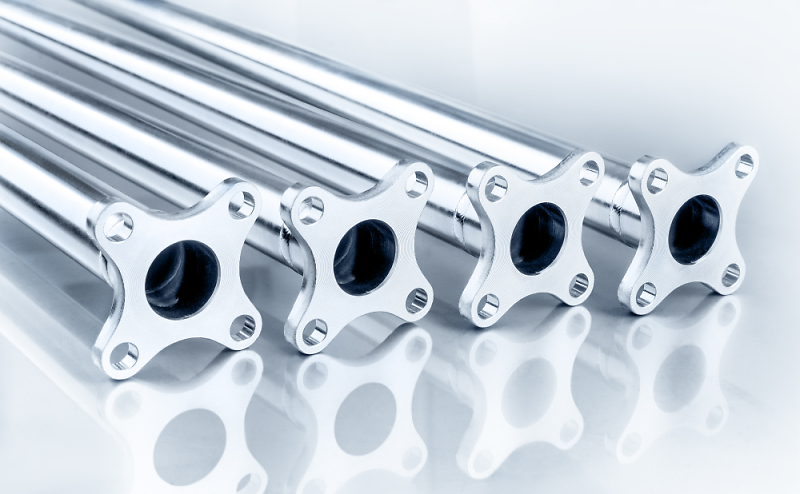
After developing in Lightroom and opening in PS for the fancy stuff, I often find myself opening Adobe Camera Raw filter to do something like white balance or noise reduction then using the history brush to selectively paint in these effects.
I basically can't really do without all of them at the moment
Here's the latest example (it's what they wanted; 4 tie rods made up from one) - in and out of all three programs. But saving back to Lightroom.

Add Comment
To leave a comment - Log in to Pentax User or create a new account.




7664 posts
18 years
Hertfordshire,
mostly.
You often find a weird division between users who fall into one camp or the other, and I find that quite weird. Lightroom is targeted to a photographers likely workflow, and you just use the bits you need...
K.
It is an illusion that photos are made with the camera… they are made with the eye, heart and head. Henri Cartier-Bresson
Lots of film bodies, a couple of digital ones, too many lenses (mainly older glass) and a Horseman LE 5x4.