All Forum Comments

I originally bought the Eye-Fi card as at the time it was the only one to support raw files but because the file sizes are so large its really difficult t work with so I have stuck with hi res jpegs. So I guess any wifi card will do the job, but I have only used the Eye-Fi card and found their support to be very good.
Comment by cabstar posted on My workflow using Eyefi card, iPhone 5S and Photogene at 12/06/2014 - 14:40
Photogene does allow you to edit images that are actually on your IOS device. I have just posted a walkthrough here on how Photogene works. Its a really powerful tool, I use it all the time particularly on the iPhone
Comment by cabstar posted on Lightroom mobile at 12/06/2014 - 14:37
Glowingblue wrote:
None, as far as I can see, edits to images are sent from iPad as a sidecar file (XML) listing exactly what has changed, this is the reason edits are performed within seconds, the sidecar file is a fraction of the image size
The only catch is the images have to be on the computer first, you can't edit images in lightroom on the iPad that have been transferred to the iPad either through a wifi card or by the camera kit. Also if you have a large number of images to work on it can take a long time for the images to transfer to the iPad to work on. I also found the iPad 2 very very slow using lightroom but it works fine on my iPad mini retina which I bought specifically for this task, to edit weddings and club shoots in the lounge whilst still able to partake in family life None, as far as I can see, edits to images are sent from iPad as a sidecar file (XML) listing exactly what has changed, this is the reason edits are performed within seconds, the sidecar file is a fraction of the image size
Darkmunk wrote:
Anyone had any experience of Lightroom on an iPad?
I'm spending a lot of time photographing away from home and I'd like to be able to sort through the images and do superficial editing in the evening.
Apparently LR can do this and send the changes to the desktop version when you get back.
But there's probably a catch?
Comment by cabstar posted on Lightroom mobile at 12/06/2014 - 14:20
Here is a little walkthrough for my workflow using the eyfi card, iPhone 5S but any IOS device will work and the app Photogene which I think is the best photo image manipulation app available.
On a dual card setup I have the Eye-Fi card set to jpegs fine and to transmit all files to the iPhone, I use the iPhone due to its size and it just stays in my pocket on a shoot. Its also convenient for checking focus accuracy and colour etc.
I also have iCloud activated so the images are shared to my iPad when I get home, so I can also work on them there too.
So heres some shots in the Eye-Fi app

These are instantly available in the photo gallery within IOS so available for edit in any app
Then in Photogene we choose an image

All tools are available through the spanner icon at the bottom of the screen which brings up a dial. So first I am going to crop the image.
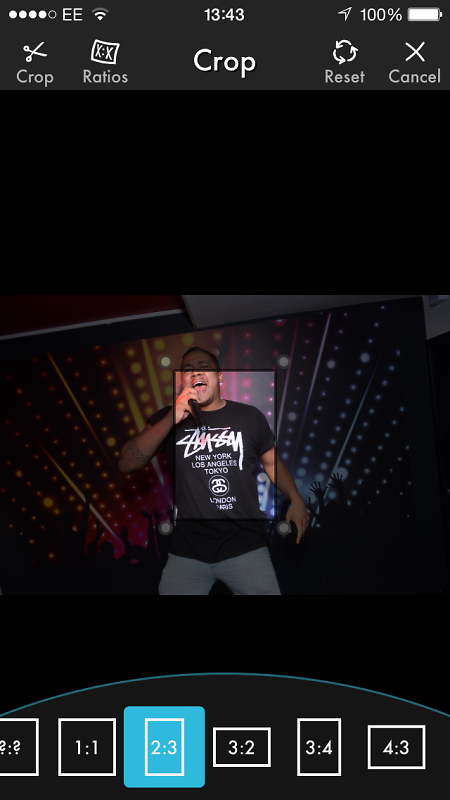
I have chosen to crop the image into portrait orientation 2:3 and an overlay appears which is just dragged around the screen using the handles.
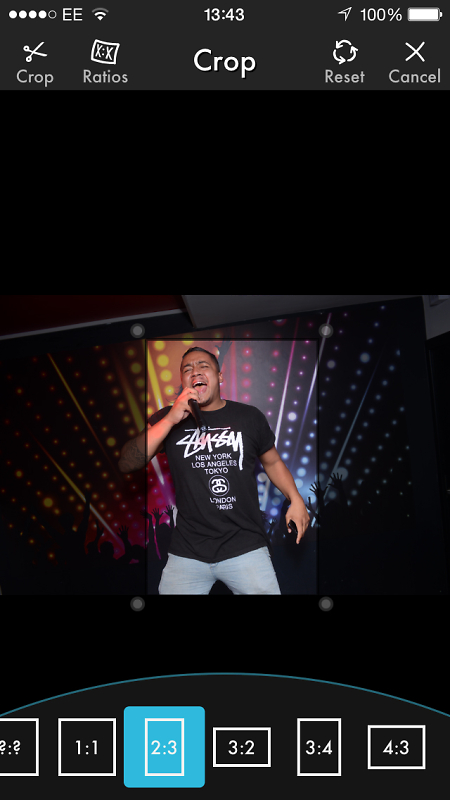
After clicking on the crop scissor icon top right I then rotate the tool menu to change exposure and contrast

I then again rotate the tool menu to go to the sharpen menu where a small amount is applied
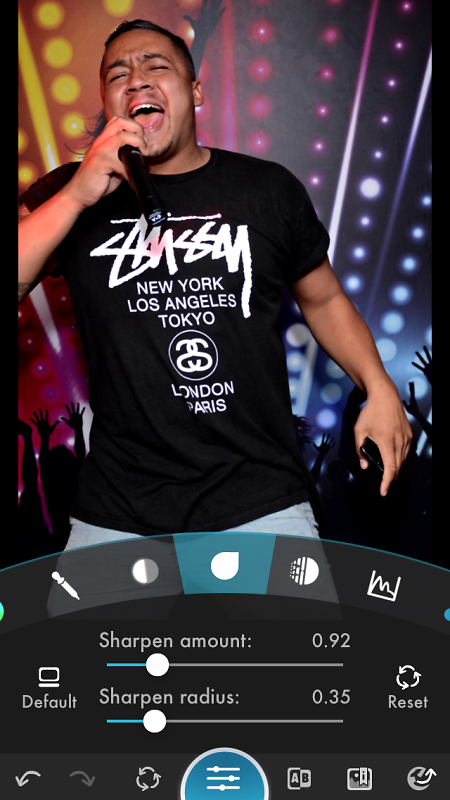
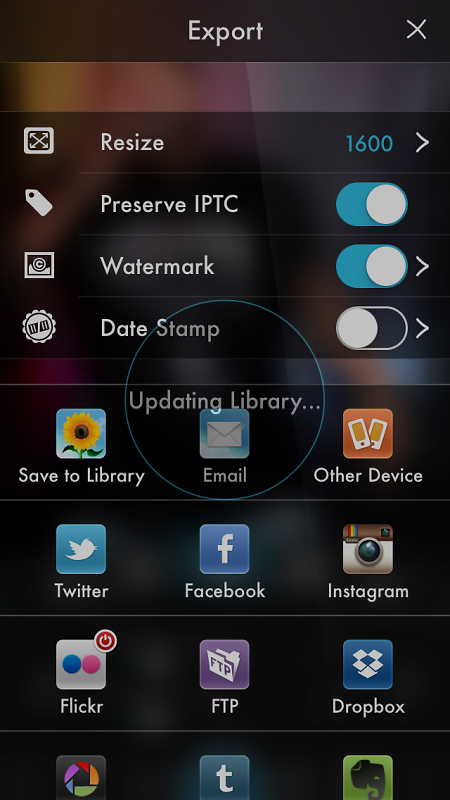
Finally the image is exported and from here you can export to library, email, other devices and many social networking venues along with FTP dropbox etc... This is what makes the app so powerful, I have used this app for gigs to send images out from the show to news outlets who need images fast.
This is the final result

On a dual card setup I have the Eye-Fi card set to jpegs fine and to transmit all files to the iPhone, I use the iPhone due to its size and it just stays in my pocket on a shoot. Its also convenient for checking focus accuracy and colour etc.
I also have iCloud activated so the images are shared to my iPad when I get home, so I can also work on them there too.
So heres some shots in the Eye-Fi app

These are instantly available in the photo gallery within IOS so available for edit in any app
Then in Photogene we choose an image

All tools are available through the spanner icon at the bottom of the screen which brings up a dial. So first I am going to crop the image.

I have chosen to crop the image into portrait orientation 2:3 and an overlay appears which is just dragged around the screen using the handles.

After clicking on the crop scissor icon top right I then rotate the tool menu to change exposure and contrast

I then again rotate the tool menu to go to the sharpen menu where a small amount is applied

Finally the image is exported and from here you can export to library, email, other devices and many social networking venues along with FTP dropbox etc... This is what makes the app so powerful, I have used this app for gigs to send images out from the show to news outlets who need images fast.

This is the final result

Comment by cabstar posted on My workflow using Eyefi card, iPhone 5S and Photogene at 12/06/2014 - 14:13
Darkmunk wrote:
So you're on the iPad Ken?
I'm not au fait with IPad and the accessories. I assumed I would need to WiFi the images across or wait till I'm back at the Mac, but I can just just use a cable. Wondrous! How did apple let that slip through
The cheap Chinese ipad camera kits work well with the ipad but none of the camera kits work with the iphone. I use a wifi card to get my images across to the ipad or iphone.So you're on the iPad Ken?
I'm not au fait with IPad and the accessories. I assumed I would need to WiFi the images across or wait till I'm back at the Mac, but I can just just use a cable. Wondrous! How did apple let that slip through
Comment by cabstar posted on Lightroom mobile at 12/06/2014 - 09:12
Lightroom on the ipad works in conjunction with your computer.
You have to upload the images to your computer then sync them with your ipad. On the ipad you can then do basic editing and select images to keep or delete.
For editing on the go photo gene as mentioned is the app to get.
You have to upload the images to your computer then sync them with your ipad. On the ipad you can then do basic editing and select images to keep or delete.
For editing on the go photo gene as mentioned is the app to get.
Comment by cabstar posted on Lightroom mobile at 12/06/2014 - 09:09
I think this would have made a more interesting portrait if you had kneeled down to his level. As it is its just a shot of a view we have all seen of a homeless person sat on the floor.
Interesting background story though.
Interesting background story though.
Comment by cabstar posted on End Homelessness Now! Project #8 at 10/06/2014 - 14:43
It's usually after a discussion like this that lots of members tend to go elsewhere, seen it happen a number of times over the years. All it would take would sometimes for the mods to explain their decision. Yes I know they don't have too and in effect it's their ball we are playing with but what good is a forum with no members?
This year the forum seems to have lost high number of contributing members, mainly due to other factors but for some moderation has been a main bug bear.
This year the forum seems to have lost high number of contributing members, mainly due to other factors but for some moderation has been a main bug bear.
Comment by cabstar posted on Heartless at 03/06/2014 - 19:37
aliengrove wrote:
Thanks for sharing, Gary. I was a bit surprised (and impressed) that all the editing was done in Lightroom, and none in PS.
I very rarely use PS only for content aware which I use very very rarely. I just find PS so slow when a lot of images need adjusting and LR lends itself to this process so much better.Thanks for sharing, Gary. I was a bit surprised (and impressed) that all the editing was done in Lightroom, and none in PS.
Comment by cabstar posted on How I edit my music shots at 02/06/2014 - 11:33

