victoria

Posted 15/11/2009 - 13:45
Link
I hope you don't mind if I place your photo to this page, you would get more comments then.
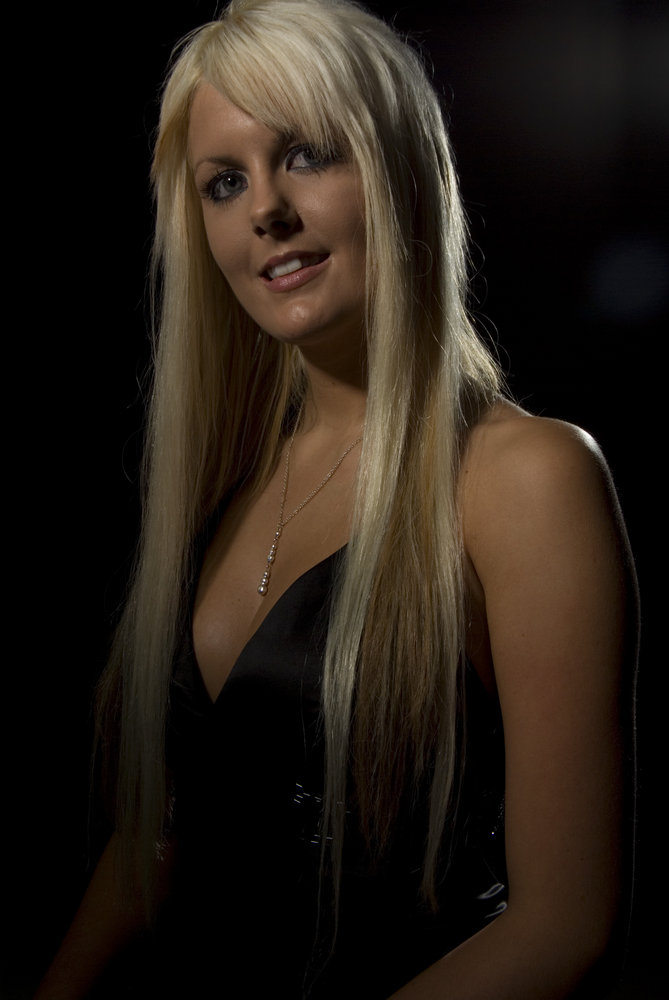
I would say the photo is a bit dark but it can easily be the screen here.
Some head room would also be better for the photo, if you had taken one step better it would have been better I believe.
Maybe also some fill light to get rid of the shadow on her neck.
Some more experienced here can probably give you some far better advise, I only played with portrait a couple of times.

I would say the photo is a bit dark but it can easily be the screen here.
Some head room would also be better for the photo, if you had taken one step better it would have been better I believe.
Maybe also some fill light to get rid of the shadow on her neck.
Some more experienced here can probably give you some far better advise, I only played with portrait a couple of times.

Posted 15/11/2009 - 14:06
Link
Stefan, I agree it's way too dark. You're also right about the head - I think she has an unfortunate growth or maybe one of those tiny bowler hats on the top of her head. But focus etc. is bang on as the eyes have it!
---------------------------------------------------
You can see some of my shots at my Flickr account.
You can see some of my shots at my Flickr account.

Posted 15/11/2009 - 16:03
Link
ok thanks - I took the pics in raw format so have scope to play in photoshop raw with the exposure etc - but i need to do a little reading up first - I have one with more headroom as well so i will get to work and post up some revisions.
cheers
will
cheers
will
K7D DA 18-55 mk11WR|50-200 wr|DA16-45|Tamron SP90|lots of manual pentax glass
Posted 15/11/2009 - 22:41
Link
I forgot to add - thanks for uploading it - i have more with all the head etc - i will get round to editing some and adding them
thanks
will
thanks
will
K7D DA 18-55 mk11WR|50-200 wr|DA16-45|Tamron SP90|lots of manual pentax glass
Posted 17/11/2009 - 19:47
Link
No problem Will, I didn't uploaded it but linked your upload to this page as an photo.
I'm at home now and the photo is darker here then it was on my parents screen.
Since you have shot it in raw you would have some room to improve the exposure just like you said.
In photoshop you could add a photo filter layer with a warm filter to warm her a bit up if you get my drift
You can also duplicate the image and use all kind of layer options for some effects.
Simply try them out and see what work and what not, that basicly the way I work
ps. I got another tip.
Jewellery is something you need to be careful with using it, it draws a lot of attention. This isn't really the case with this photo but keep an eye out for that when shooting portraits next time.
I'm at home now and the photo is darker here then it was on my parents screen.
Since you have shot it in raw you would have some room to improve the exposure just like you said.
In photoshop you could add a photo filter layer with a warm filter to warm her a bit up if you get my drift
You can also duplicate the image and use all kind of layer options for some effects.
Simply try them out and see what work and what not, that basicly the way I work
ps. I got another tip.
Jewellery is something you need to be careful with using it, it draws a lot of attention. This isn't really the case with this photo but keep an eye out for that when shooting portraits next time.
Stefan

K10D, K5
DA* 16-50, DA* 50-135, D-FA 100 Macro, DA 40 Ltd, DA 18-55
AF-540FGZ

K10D, K5
DA* 16-50, DA* 50-135, D-FA 100 Macro, DA 40 Ltd, DA 18-55
AF-540FGZ
Posted 17/11/2009 - 21:14
Link
I see you've a second photo up, that one looks very nice and that you miss the top of her head their isn't that bad, it help the composition since the focus is on her eyes.
The exposure is also much better, maybe do a tiny bit of photoshoping to make the photo "pop"a bit more?
The exposure is also much better, maybe do a tiny bit of photoshoping to make the photo "pop"a bit more?
Stefan
K10D, K5
DA* 16-50, DA* 50-135, D-FA 100 Macro, DA 40 Ltd, DA 18-55
AF-540FGZ
K10D, K5
DA* 16-50, DA* 50-135, D-FA 100 Macro, DA 40 Ltd, DA 18-55
AF-540FGZ
Posted 17/11/2009 - 21:23
Link
yes - thanks for the advice - i chopped her hesd on the second one on purpose for the close up on the eyes but i still have lots to learn with photoshop as i want to get rid of the eyelash shadows on her eyes. i did try to pop the colours but the red background looks too bright then so i need to create a layer to control that i think
K7D DA 18-55 mk11WR|50-200 wr|DA16-45|Tamron SP90|lots of manual pentax glass
Posted 17/11/2009 - 21:48
Link
Will, version of photoshop are you using?
You can quite effectivly clone out the eyelash shadows or you can use the healtool that's in the CS4.
As for certain colours looking to bright here is a helpful tip for that.
Making an black & white adjustment layer effectively making a black and white and duplicate the layer with the right colour and put it above the B&W adjustment layer and set the layer on "colour" it will colour in the black and white.
Now the trick is that you can use the B&W adjustment make cartain colours brighter or darker.
I almost alsways do that since you have quite a lot of control and you can always change the settings when needed.
You can quite effectivly clone out the eyelash shadows or you can use the healtool that's in the CS4.
As for certain colours looking to bright here is a helpful tip for that.
Making an black & white adjustment layer effectively making a black and white and duplicate the layer with the right colour and put it above the B&W adjustment layer and set the layer on "colour" it will colour in the black and white.
Now the trick is that you can use the B&W adjustment make cartain colours brighter or darker.
I almost alsways do that since you have quite a lot of control and you can always change the settings when needed.
Stefan
K10D, K5
DA* 16-50, DA* 50-135, D-FA 100 Macro, DA 40 Ltd, DA 18-55
AF-540FGZ
K10D, K5
DA* 16-50, DA* 50-135, D-FA 100 Macro, DA 40 Ltd, DA 18-55
AF-540FGZ
Posted 17/11/2009 - 22:25
Link
I have cs2 and have just bought a bamboo pen graphics tablet on the advice you gave on another topic - thanks for the tips, i will have a go tomorrow at learning some of the things you have suggested
K7D DA 18-55 mk11WR|50-200 wr|DA16-45|Tamron SP90|lots of manual pentax glass
Posted 17/11/2009 - 22:38
Link
Will, that you could follow my comment. I'm having problems reading it myself.
CS2 would do most tricks that you would need and the tablet would help you with that a bit. Using it for burn and doge is quite a pleasure.
Those tablets also come with a mouse right, how are those?
Here is that colour thing I was explain in my previous comment but then in steps.
- B&W adjustment layer
- duplicate correct colour layer and place it above the B&W layer
- set duplicated layer option to "color"
- adjust the B&W layer to control the colours
CS2 would do most tricks that you would need and the tablet would help you with that a bit. Using it for burn and doge is quite a pleasure.
Those tablets also come with a mouse right, how are those?
Here is that colour thing I was explain in my previous comment but then in steps.
- B&W adjustment layer
- duplicate correct colour layer and place it above the B&W layer
- set duplicated layer option to "color"
- adjust the B&W layer to control the colours
Stefan
K10D, K5
DA* 16-50, DA* 50-135, D-FA 100 Macro, DA 40 Ltd, DA 18-55
AF-540FGZ
K10D, K5
DA* 16-50, DA* 50-135, D-FA 100 Macro, DA 40 Ltd, DA 18-55
AF-540FGZ
Add Comment
To leave a comment - Log in to Pentax User or create a new account.




228 posts
22 years
Somerset UK
link
K7D DA 18-55 mk11WR|50-200 wr|DA16-45|Tamron SP90|lots of manual pentax glass