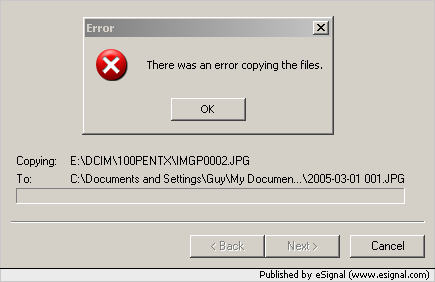
There was an error copying the files

Posted 01/03/2005 - 10:51
Link
Here is a picture of the copy dialog with the error dialog on top of it:


Posted 01/03/2005 - 12:28
Link
Just a thought...
The USB interface between PC and camera is just a standard so there shouldn't be an issue.
Have you tried using a card reader? I recently saw a defective SD card do this - both from the camera and in a card reader. There was a serious problem in the card that meant you couldn't even reformat in a card reader.
Matt
The USB interface between PC and camera is just a standard so there shouldn't be an issue.
Have you tried using a card reader? I recently saw a defective SD card do this - both from the camera and in a card reader. There was a serious problem in the card that meant you couldn't even reformat in a card reader.
Matt
Posted 01/03/2005 - 13:10
Link
I think that you might be right about a defective card. I tried this on another PC and this time I could see the directory on the camera and when trying to copy it gave:
Cannot copy filename.img The parameter is incorrect.
Then I tested it on the telly and the photos showed up fine.
Then I went back to the original PC tried it a couple more times with the same original error and then about 2 hours later tried it again and suddenly it worked. It certainly sounds like the SD card is defective.
I didn't know that you could format the SD card. Should I have done this before using it? Is there an option on the camera to do this?
Cannot copy filename.img The parameter is incorrect.
Then I tested it on the telly and the photos showed up fine.
Then I went back to the original PC tried it a couple more times with the same original error and then about 2 hours later tried it again and suddenly it worked. It certainly sounds like the SD card is defective.
I didn't know that you could format the SD card. Should I have done this before using it? Is there an option on the camera to do this?
Posted 01/03/2005 - 13:23
Link
Hi!
Yes, you can format in camera, or on a PC with a card-reader.
My sister picked up an USB-SD card reader for her S40 from www.7dayshop.com for £1.99 - might be worth trying!!
Matt
Yes, you can format in camera, or on a PC with a card-reader.
My sister picked up an USB-SD card reader for her S40 from www.7dayshop.com for £1.99 - might be worth trying!!
Matt
Posted 01/03/2005 - 15:13
Link
Many thanks for the help MattMatic
Turns out I'm a bit of an idiot contrary to my own opinion. I completely forgot that all devices need to be formatted first. It's working like a dream now.
Turns out I'm a bit of an idiot contrary to my own opinion. I completely forgot that all devices need to be formatted first. It's working like a dream now.
Posted 01/03/2005 - 15:18
Link
Glad to help
Matt
Matt
Add Comment
To leave a comment - Log in to Pentax User or create a new account.




12 posts
21 years
"There was an error copying the files."
message.
I'm a computer savvy user and have hooked up other digital cameras to this PC without a problem. All else seems to be in order.
Using the file explorer I can see the camera as my E: drive but when I try to go into the folder under the E drive it gives me an error.
Any ideas?