Post Processing Challenge #2 : Gone Fishing

Posted 10/03/2011 - 20:05
Link
Fishing in the countryside.


Posted 11/03/2011 - 00:28
Link
I've tried to give this a bit of an old family album look:
Lightroom. Brightness, contrast and black levels up, clarity and saturation reduced and a vignette applied.

Lightroom. Brightness, contrast and black levels up, clarity and saturation reduced and a vignette applied.

Posted 11/03/2011 - 00:57
Link
And now for something completely different ........ a dogfish??

Just a little modest chicanery and cropping
Andrew

Just a little modest chicanery and cropping
Andrew

Posted 11/03/2011 - 01:15
Link
I didn't really relate to this image as a colour shot, so I used Channel Mixer to change the tones, Hue/Saturation to produce the sepia tone, Texturiser, Burlap to create the texture and finally resizing and sharpening. I then added a wide white border to simulate an en-print of the 1950s or 1960s.
[IMG]http://i240.photobucket.com/albums/ff250/johnriley1uk/018Mike-P.jpg[/IMG]
[IMG]http://i240.photobucket.com/albums/ff250/johnriley1uk/018Mike-P.jpg[/IMG]
Best regards, John

Posted 11/03/2011 - 07:29
Link
My own variation on the 'old family photo' look.
[IMG]http://i140.photobucket.com/albums/r35/digitalCG/IMGP0512-pola800.jpg[/IMG]
Square crop, ran that through Poladroid, added the coffee stain. There's something about this challenge that makes me want to try the things I ordinarily wouldn't
[IMG]http://i140.photobucket.com/albums/r35/digitalCG/IMGP0512-pola800.jpg[/IMG]
Square crop, ran that through Poladroid, added the coffee stain. There's something about this challenge that makes me want to try the things I ordinarily wouldn't

Posted 11/03/2011 - 12:04
Link
B&W for me as well, the image has family snapshot 70's feel about it to me. Most PP done in B&W studio with a Kodak film preset with various adjustments to black saturation, contrast, shadows etc and a warming tone, finally resized, cropped and a touch of unsharp mask in PSE
[IMG]http://i1098.photobucket.com/albums/g370/jimbo_609/IMGP0512.jpg[/IMG]
[IMG]http://i1098.photobucket.com/albums/g370/jimbo_609/IMGP0512.jpg[/IMG]
Great simplicity is only won by an intense moment or by years of intelligent effort. T.S Eliot
Gear Not enough!!
PPG
Flickr
My not so new website
Gear Not enough!!
PPG
Flickr
My not so new website

Posted 15/03/2011 - 06:01
Link
A homage to slide film.
[IMG]http://i206.photobucket.com/albums/bb113/pnjmcc/GoneFishingentry1.jpg[/IMG]
Created six new layers, 3 above and 3 below, added increasing ammounts of Gausian Blur to each to simulate a narrow DoF (Tilt n Shift) effect to keep the focus on the bridge.
Then layer masked each to piant out the bridge and keep it sharp
Cropped out the two people on the L/H side and then cloned out the dog.
Flattened then copied to a new layer, increased saturation and dropped opacity to give it the over coloured look that colour slide film has. Then used basic tools to draw a fake slide film border around it.
Regards
PaulM
[IMG]http://i206.photobucket.com/albums/bb113/pnjmcc/GoneFishingentry1.jpg[/IMG]
Created six new layers, 3 above and 3 below, added increasing ammounts of Gausian Blur to each to simulate a narrow DoF (Tilt n Shift) effect to keep the focus on the bridge.
Then layer masked each to piant out the bridge and keep it sharp
Cropped out the two people on the L/H side and then cloned out the dog.
Flattened then copied to a new layer, increased saturation and dropped opacity to give it the over coloured look that colour slide film has. Then used basic tools to draw a fake slide film border around it.
Regards
PaulM
All cameras are equal but.....
Some are more equal than others
Some are more equal than others


Posted 15/03/2011 - 16:19
Link
Here's mine
[IMG]http://i941.photobucket.com/albums/ad254/weldingblues/Modified%20forum%20shots/PU-IMGP05122.jpg[/IMG]
I have tried to create a painted type of effect.
5 layers with cutout, dry brush, paint daubs filters + Levels adjustment then a layer mask to distort the edges. Merged these then duplicated into another layer, converted this in to B & W (scenic landscape) opacity set to 48%, merged and that's it.
All carried out in Elements 8 with a layer mask add on installed.
[IMG]http://i941.photobucket.com/albums/ad254/weldingblues/Modified%20forum%20shots/PU-IMGP05122.jpg[/IMG]
I have tried to create a painted type of effect.
5 layers with cutout, dry brush, paint daubs filters + Levels adjustment then a layer mask to distort the edges. Merged these then duplicated into another layer, converted this in to B & W (scenic landscape) opacity set to 48%, merged and that's it.
All carried out in Elements 8 with a layer mask add on installed.
Colin
“Nobody made a greater mistake than he who did nothing because he could do only a little.”
Edmund Burke (1729 – 1797)
[IMG]http://i941.photobucket.com/albums/ad254/weldingblues/K-7userbar-red.jpg[/IMG]
“Nobody made a greater mistake than he who did nothing because he could do only a little.”
Edmund Burke (1729 – 1797)
[IMG]http://i941.photobucket.com/albums/ad254/weldingblues/K-7userbar-red.jpg[/IMG]

Posted 15/03/2011 - 22:53
Link
my go
[IMG]http://i227.photobucket.com/albums/dd72/geordie2831/fishing.jpg[/IMG]
cropped
and highlights and shadows adjusted in pse7
it is what it is a family snap shot
[IMG]http://i227.photobucket.com/albums/dd72/geordie2831/fishing.jpg[/IMG]
cropped
and highlights and shadows adjusted in pse7
it is what it is a family snap shot


Posted 20/03/2011 - 19:16
Link
And now for the judging ...
As per the last challenge, just a few comments. I was thinking of this one more as a cropping excericse if I'm honest. As already mentioned, it's just a family shot type pic and I was interested in seeing what would be left in/taken out with a crop. Obviously the processing has also been taken into consideration.
Tyr
The crop I actually went for originally, nice job. very colourful
Mannesty.
Same crop again ... like the effect.
Well done on making the Heron more obvious because up until your effort I didn't even realise there was one in the photo.
DrOrloff
You achieved your family album look but I think it looks a bit unbalanced with the bridge going nowhere.
andrewk
Well it's different, although I can't remember a Dogfish
John.
First person to do a mono conversion .. good effect
digitalCG
A different take on the photo again, quite like the idea.
sandinista
Nice mono conversion, for me it maybe needs a bit more sharpening.
pnjmcc
When I first saw this I was rather taken aback but after a week it has actually turned out to be my favourite.
Not keen on the border but the processing is great.
aliengrove
Another good effort, the processing has give the picture a nice clean bright look and it does benefit from the loss of the houses in the background.
CoDa
Sounds like a lot of work, good effect. For me I would like it a bit darker though.
geordie01
Nice simple conversion with some cropping .. nicely done.
ReklawyksEkul
I liked this quite a lot, had you left a bit more space above and not cropped out the womans elbow to the right you would have been in my top 3.
Anyway, good effort from all .. purely down to my personal taste at the end of the day.
In the great competition tradition, the rankings are in reverse order.
3.Mannesty
2.johnriley
Drum roll .........
1.pnjmcc
Just out of interest, this is what I originally settled on when I took the pic.

Fishing by Mike.Pursey, on Flickr
As per the last challenge, just a few comments. I was thinking of this one more as a cropping excericse if I'm honest. As already mentioned, it's just a family shot type pic and I was interested in seeing what would be left in/taken out with a crop. Obviously the processing has also been taken into consideration.
Tyr
The crop I actually went for originally, nice job. very colourful
Mannesty.
Same crop again ... like the effect.
Well done on making the Heron more obvious because up until your effort I didn't even realise there was one in the photo.
DrOrloff
You achieved your family album look but I think it looks a bit unbalanced with the bridge going nowhere.
andrewk
Well it's different, although I can't remember a Dogfish
John.
First person to do a mono conversion .. good effect
digitalCG
A different take on the photo again, quite like the idea.
sandinista
Nice mono conversion, for me it maybe needs a bit more sharpening.
pnjmcc
When I first saw this I was rather taken aback but after a week it has actually turned out to be my favourite.
Not keen on the border but the processing is great.
aliengrove
Another good effort, the processing has give the picture a nice clean bright look and it does benefit from the loss of the houses in the background.
CoDa
Sounds like a lot of work, good effect. For me I would like it a bit darker though.
geordie01
Nice simple conversion with some cropping .. nicely done.
ReklawyksEkul
I liked this quite a lot, had you left a bit more space above and not cropped out the womans elbow to the right you would have been in my top 3.
Anyway, good effort from all .. purely down to my personal taste at the end of the day.
In the great competition tradition, the rankings are in reverse order.
3.Mannesty
2.johnriley
Drum roll .........
1.pnjmcc
Just out of interest, this is what I originally settled on when I took the pic.

Fishing by Mike.Pursey, on Flickr
Posted 20/03/2011 - 22:52
Link
Wow,
I did not expect to win this one. I initially struggled to find a crop that would look balanced (in my eyes) and still keep all the elements that I felt were important parts to the image. Then when I saw how good everyone else's efforts looked I thought I had over complicated it.
Thanks to Mike-P for the judging and congratulations to everyone.
I now need to go find a picture to submit for the next one
Regards
PaulM
I did not expect to win this one. I initially struggled to find a crop that would look balanced (in my eyes) and still keep all the elements that I felt were important parts to the image. Then when I saw how good everyone else's efforts looked I thought I had over complicated it.
Thanks to Mike-P for the judging and congratulations to everyone.
I now need to go find a picture to submit for the next one
Regards
PaulM
All cameras are equal but.....
Some are more equal than others
Some are more equal than others
Add Comment
To leave a comment - Log in to Pentax User or create a new account.




13627 posts
18 years
Hythe,
Hampshire UK
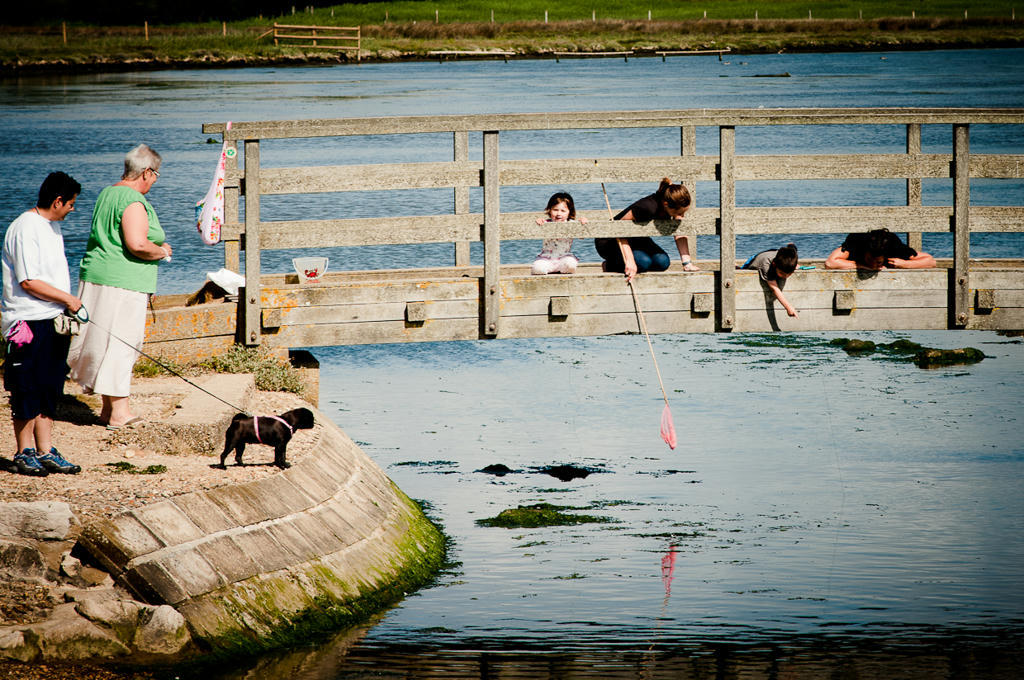
Here is the second challenge .. a picture I took last year of a family fishing off a bridge. Time to get your PP skills working overtime.
Will finish this on on Sunday 20th March at 7pm.
Click on your preferred file format and then on download just above the picture.
PEF
JPEG
[IMG]http://img.photobucket.com/albums/v188/Sockpuppetuk/IMGP0512.jpg[/IMG]