New type of snow flower

Posted 07/01/2010 - 09:30
Link
It's well-taken, and the snow especially is very well exposed, but the subject just doesn't hold my interest enough unfortunately!
Tim
AF - Pentax K5, Sigma 10-20/4-5.6, Tamron 17-50/2.8, Sigma 30/1.4, Sigma 70-200/2.8, Tamron 70-300/4-5.6
MF - Vivitar CF 28/2.8, Tamron AD2 90/2.5, MTO 1000/11
Stuff - Metz 58 AF1, Cactus v4, Nikon SB24, Raynox 150, Sigma 1.4x TC, Sigma 2x TC, Kenko 2x macro TC, Redsnapper 283 tripod, iMac 27”, Macbook Pro 17”, iPad, iPhone 3G
Flickr • Fluidr • PPG • Street • Portfolio site
Feel free to edit any of my posted photos! If I post a photo for critique, I want brutal honesty. If you don't like it, please say so and tell me why!
AF - Pentax K5, Sigma 10-20/4-5.6, Tamron 17-50/2.8, Sigma 30/1.4, Sigma 70-200/2.8, Tamron 70-300/4-5.6
MF - Vivitar CF 28/2.8, Tamron AD2 90/2.5, MTO 1000/11
Stuff - Metz 58 AF1, Cactus v4, Nikon SB24, Raynox 150, Sigma 1.4x TC, Sigma 2x TC, Kenko 2x macro TC, Redsnapper 283 tripod, iMac 27”, Macbook Pro 17”, iPad, iPhone 3G
Flickr • Fluidr • PPG • Street • Portfolio site
Feel free to edit any of my posted photos! If I post a photo for critique, I want brutal honesty. If you don't like it, please say so and tell me why!

Posted 07/01/2010 - 10:08
Link
Colin,
I thought that C&C might be facilitated if I had a dabble with your image - I hope you don't mind! Not sure what software you use for your images - what I have done is with Lightroom 3 beta.
My aim was to give the image a bit of a lift, and a bit more life / zing etc.
Essentially, white balance and tint were increased to the 'light' (right hand) sides.
The black point was upped to 7; the contrast, clarity and vibrance were all increased. Exposure was opened up by a quarter of a stop. I changed the 'curve' from linear to medium contrast also.
I increased the saturation of greens, blues and reds a little, and lastly sharpened only the main details a little (I masked everything else).
While this might sound a bit complicated, it's all achieved with a few sliders and buttons - if you don't like an effect, slide the control back the other way! You can't hurt the image. It's all up to you and your Mk I eyeball - if you like the look of it, then keep it. It's largely personal taste.
Anyway, here's my take on it - your mileage may of course vary (and well done if it does).
I have had to do this via a link to the image in my Pbase gallery, as I still cannot get images to link and embed here...
link
I thought that C&C might be facilitated if I had a dabble with your image - I hope you don't mind! Not sure what software you use for your images - what I have done is with Lightroom 3 beta.
My aim was to give the image a bit of a lift, and a bit more life / zing etc.
Essentially, white balance and tint were increased to the 'light' (right hand) sides.
The black point was upped to 7; the contrast, clarity and vibrance were all increased. Exposure was opened up by a quarter of a stop. I changed the 'curve' from linear to medium contrast also.
I increased the saturation of greens, blues and reds a little, and lastly sharpened only the main details a little (I masked everything else).
While this might sound a bit complicated, it's all achieved with a few sliders and buttons - if you don't like an effect, slide the control back the other way! You can't hurt the image. It's all up to you and your Mk I eyeball - if you like the look of it, then keep it. It's largely personal taste.
Anyway, here's my take on it - your mileage may of course vary (and well done if it does).
I have had to do this via a link to the image in my Pbase gallery, as I still cannot get images to link and embed here...
link

Posted 07/01/2010 - 10:36
Link
i-berg: you need to change security settings on your picture.
Posted 07/01/2010 - 10:48
Link
TonyM wrote:
i-berg: you need to change security settings on your picture.
Tony,i-berg: you need to change security settings on your picture.
Thanks for the tip - and gladly, if I knew where & what they were (I have not added anything by way of security to my account, images or galleries). Interesting thing is that one of my images here stayed put, and continues to do so, yet its stablemates (even those from the same gallery) won't play.
Have you got any handy hints / experience with Pbase per chance please?
Colin - apologies for diverting your thread for entirely selfish motives

Posted 07/01/2010 - 13:26
Link
i-berg,
I cannot use the link it comes up with this message;
Forbidden
You don't have permission to access /o6/78/932378/1/120874275.E3a1r0mJ.06012010.jpg on this server.
I look forward to seeing the picture at some stage.
Regards
I cannot use the link it comes up with this message;
Forbidden
You don't have permission to access /o6/78/932378/1/120874275.E3a1r0mJ.06012010.jpg on this server.
I look forward to seeing the picture at some stage.
Regards
Colin
“Nobody made a greater mistake than he who did nothing because he could do only a little.”
Edmund Burke (1729 – 1797)
[IMG]http://i941.photobucket.com/albums/ad254/weldingblues/K-7userbar-red.jpg[/IMG]
“Nobody made a greater mistake than he who did nothing because he could do only a little.”
Edmund Burke (1729 – 1797)
[IMG]http://i941.photobucket.com/albums/ad254/weldingblues/K-7userbar-red.jpg[/IMG]
Posted 08/01/2010 - 06:27
Link
Weldingblues wrote:
i-berg,
I cannot use the link it comes up with this message;
Forbidden
You don't have permission to access /o6/78/932378/1/120874275.E3a1r0mJ.06012010.jpg on this server.
I look forward to seeing the picture at some stage.
Regards
Colin,i-berg,
I cannot use the link it comes up with this message;
Forbidden
You don't have permission to access /o6/78/932378/1/120874275.E3a1r0mJ.06012010.jpg on this server.
I look forward to seeing the picture at some stage.
Regards
This access issue is part of a series - I have asked for assistance from the site admin team in the open chat forum.
In the meantime, if you wish, you should be able to navigate to your pic manually like this:
Using your browser, go to www.pbase.com/iberg
Click on the thumbnail image for the gallery called 'Outdoors'.
Yours is the last image there - and it has your name on it of course.
Posted 08/01/2010 - 09:23
Link
i-berg,
I see what you have done, I use PSE 6 for photo editing so will have a play.
The learning continues.
Regards
I see what you have done, I use PSE 6 for photo editing so will have a play.
The learning continues.
Regards
Colin
“Nobody made a greater mistake than he who did nothing because he could do only a little.”
Edmund Burke (1729 – 1797)
[IMG]http://i941.photobucket.com/albums/ad254/weldingblues/K-7userbar-red.jpg[/IMG]
“Nobody made a greater mistake than he who did nothing because he could do only a little.”
Edmund Burke (1729 – 1797)
[IMG]http://i941.photobucket.com/albums/ad254/weldingblues/K-7userbar-red.jpg[/IMG]
Posted 08/01/2010 - 09:48
Link
Weldingblues wrote:
i-berg,
I see what you have done, I use PSE 6 for photo editing so will have a play.
The learning continues.
Regards
Colin,i-berg,
I see what you have done, I use PSE 6 for photo editing so will have a play.
The learning continues.
Regards
I also have PSE 6, and it gets less work than LR3.
The latter is available free as a beta release (a Google search will get you to the download), but expires in a month or three. If you shoot RAW (highly recommended), then it is not a bad way to go, although you may already be using Adobe Camera Raw (ACR), which is sort of similar to Lightroom, as the front end of PSE6 if you shoot in RAW yourself.
PS - I don't have shares in Adobe, and I don't work for them or any other software or imaging co., so this is not a promotion - just my personal preference for post-processing my own images.
Add Comment
To leave a comment - Log in to Pentax User or create a new account.


1384 posts
17 years
Bedford
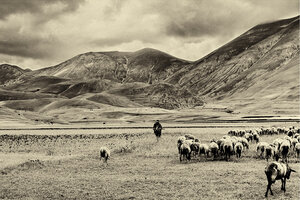
[IMG]http://i941.photobucket.com/albums/ad254/weldingblues/06-01-2010.jpg[/IMG]
This has been cropped, and auto colour adjustment only.
C & C as normal please
“Nobody made a greater mistake than he who did nothing because he could do only a little.”
Edmund Burke (1729 – 1797)
[IMG]http://i941.photobucket.com/albums/ad254/weldingblues/K-7userbar-red.jpg[/IMG]