K5 Flash Problem

Posted 28/05/2013 - 09:44
Link
Are you using the Metz flash in PTTL or Manual mode? I think people will need a little more info in order to provide any guidance.
Fletcher8.

Posted 28/05/2013 - 09:55
Link
Yes sorry yes connected in pttl
Posted 28/05/2013 - 10:32
Link
Andrew, PTTL can be a bit hit and miss, but if you are getting a lot of over exposed images when your flash is in PTTL, try dialling in some - flash comp. You will have to just try varying amounts but a a general rule of thumb, -0.7 is a good starting point.
If you want to get consistent exposure, learn to use your flash in manual mode, it does take practice, but it's a lot easier than people think. You can use your cameras histogram to chimp how high or low your power needs to be on your flash. You can find some great online tutorials on youtube, or go to http://strobist.blogspot.co.uk/2006/03/lighting-101.html
hope this helps
If you want to get consistent exposure, learn to use your flash in manual mode, it does take practice, but it's a lot easier than people think. You can use your cameras histogram to chimp how high or low your power needs to be on your flash. You can find some great online tutorials on youtube, or go to http://strobist.blogspot.co.uk/2006/03/lighting-101.html
hope this helps
Fletcher8.
Posted 28/05/2013 - 10:50
Link
Hi fletcher i did use a yn56 before this in manual i just went to the metz for ease every shot with the metz was there about perfect on the k30 just put on the k5 and every shot was bad i did dial in -2.0 on the flash comp and the pics was still slighty burning out i have just updated firmware on the k5 as it was v101 i think and that has improved it unless i have caught something and now changed flash comp to -0.3 and looks ok will have a play with that for a couple of days, i did read before getting the k5 it had slight issues with flash.

Posted 28/05/2013 - 11:31
Link
I have exactly the same problem with K5 and Metz 58 af-1 and 2 (both updated).
I'm assuming it's me (I don't use them often in PTTL). On the K10D it was better, but A mode was always better than PTTL.
I don't think I've ever taken a successful fill-in flash shot. Skies are always washed out, defeating the object.
Surely with PTTL, nothing in the frame should be burned out? but no matter what settings I've tried on camera and flash, I just can't trust it. It's infuriating.
I'm assuming it's me (I don't use them often in PTTL). On the K10D it was better, but A mode was always better than PTTL.
I don't think I've ever taken a successful fill-in flash shot. Skies are always washed out, defeating the object.
Surely with PTTL, nothing in the frame should be burned out? but no matter what settings I've tried on camera and flash, I just can't trust it. It's infuriating.

Posted 28/05/2013 - 11:39
Link
Is the 58-AF1's secondary reflector firing?
I had over exposure issues with my 58-AF2 with K5 & K5IIs when shooting subjects at close to moderate distance with the secondary reflector on in PTTL mode, switching to A mode solved all my over exposure/under exposure problems (even when bounced).
I had over exposure issues with my 58-AF2 with K5 & K5IIs when shooting subjects at close to moderate distance with the secondary reflector on in PTTL mode, switching to A mode solved all my over exposure/under exposure problems (even when bounced).
Cheers
Brian.
LBA is good for you, a Lens a day helps you work, rest and play.
Brian.
LBA is good for you, a Lens a day helps you work, rest and play.

Posted 28/05/2013 - 12:18
Link
Which mode are you shooting in? I find manual mode on the body and pttl works best. set the aperture you require and then I set the shutter speed same as the lens length unless I am being creative, then the flash will work out the correct exposure. I find that av and sv seem to confuse either the body or the flash. Maybe thats how its supposed to work or not, been a long time since I read Mattmatics flash book.
PPG Wedding photography Flickr
Concert photography
Currently on a Pentax hiatus until an FF Pentax is released
Concert photography
Currently on a Pentax hiatus until an FF Pentax is released
Posted 28/05/2013 - 13:12
Link
I'm often in manual on the camera, So I suspect it's not that, but I'll check, thanks.
It's outdoors that it gets confused. Not necessarily bright light.
One thing which will obviously not work is having it on AV in bright light, with the shutter condemned by the flash synch to slower than 160th, so over-exposure can result, but it's usually obvious when that has happened.
As an aside, I'll have a play with high speed sync and let you know what happens.
It's outdoors that it gets confused. Not necessarily bright light.
One thing which will obviously not work is having it on AV in bright light, with the shutter condemned by the flash synch to slower than 160th, so over-exposure can result, but it's usually obvious when that has happened.
As an aside, I'll have a play with high speed sync and let you know what happens.
Posted 28/05/2013 - 13:24
Link
Hi the secondary reflector is firing on mine i have just updated the flash to latest firmware its still same needs the flash compensation turned down a little, i use the camera in av mode have just tried turning the flash onto a looks ok but starts to under expose the further the object is away a little to soon thats not to much bother i can play with that over i cant, ps darkmunk some nice shots on your site.
Posted 28/05/2013 - 13:35
Link
Thanks Andrew
Off to the garden for 10 minutes of testing...
Off to the garden for 10 minutes of testing...
Posted 28/05/2013 - 14:03
Link
Oh well, that was predictable. Couldn't get it to do anything wrong!
Still, here are some quick and dirty fill flash examples, with notes on how each was achieved. All but one on PTTL.
Flash turned on, camera left in AV, F4. So couldn't shut down for sky.

Camera on Manual, exposed for the sky, F16, 125th, 100iso

Camera on AV, shut down to F22, ISO 80

Same but flash turned off.
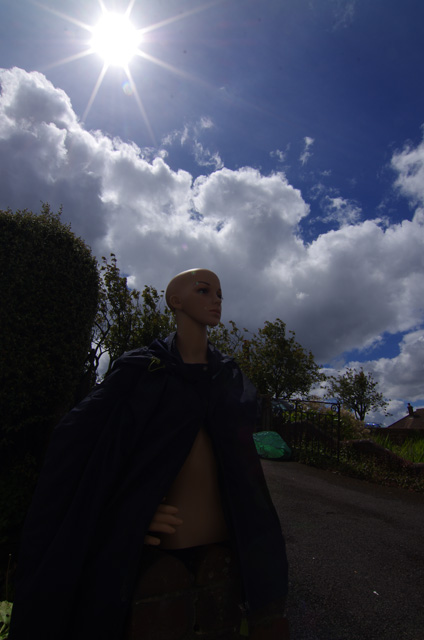
Flash on High Speed Sync, AV mode, F8, 1/800th.

Ignore any slight exposure issues, it wasn't very scientific and EV was -1 as I forgot to move it back after an early shot
Still, here are some quick and dirty fill flash examples, with notes on how each was achieved. All but one on PTTL.
Flash turned on, camera left in AV, F4. So couldn't shut down for sky.

Camera on Manual, exposed for the sky, F16, 125th, 100iso

Camera on AV, shut down to F22, ISO 80

Same but flash turned off.

Flash on High Speed Sync, AV mode, F8, 1/800th.

Ignore any slight exposure issues, it wasn't very scientific and EV was -1 as I forgot to move it back after an early shot
Posted 28/05/2013 - 15:03
Link
Without teaching people to suck eggs, hereare some options to think about.
Put your camera in manual mode, you can then use apeture to control the flash and the shutter speed to control the ambient light. Just use your histrogram to check for exposure.
Remember that you can increase the iso on the flash and on the camera, setting the same ISO on both will help and if you have a model where you can set the apeture, thats half the job done for you.
If you are using flash outside and hit the flashsync speed limit, you can use an ND filter, Lightcraft's variable ND is really good for this and will help keep your shutter speed in the flash sync region.
Without getting to technical, just remember, the flash power to subject distance ratio (Inverse Square Law stuff)
Last thing bare flash will be harsh, you can make some effective DIY light modifiers for about £2 that will work really well. If you shoot in maual with your flash and camera often enough you will learn rough settings and distances in terms of power. The Metz 58 is a really good flash and its A mode works about 95% of the time for run and gun sittuations.
Put your camera in manual mode, you can then use apeture to control the flash and the shutter speed to control the ambient light. Just use your histrogram to check for exposure.
Remember that you can increase the iso on the flash and on the camera, setting the same ISO on both will help and if you have a model where you can set the apeture, thats half the job done for you.
If you are using flash outside and hit the flashsync speed limit, you can use an ND filter, Lightcraft's variable ND is really good for this and will help keep your shutter speed in the flash sync region.
Without getting to technical, just remember, the flash power to subject distance ratio (Inverse Square Law stuff)
Last thing bare flash will be harsh, you can make some effective DIY light modifiers for about £2 that will work really well. If you shoot in maual with your flash and camera often enough you will learn rough settings and distances in terms of power. The Metz 58 is a really good flash and its A mode works about 95% of the time for run and gun sittuations.
Fletcher8.
Posted 28/05/2013 - 15:19
Link
I didn't realise you where working outside. The camera is metering on the dummy which is overexposing the sky etc. You need to manually Meyer for the sky and then adjust the flash to expose the dummy. This is way beyond the means of the camera and flash guns auto modes.
PPG Wedding photography Flickr
Concert photography
Currently on a Pentax hiatus until an FF Pentax is released
Concert photography
Currently on a Pentax hiatus until an FF Pentax is released
Add Comment
To leave a comment - Log in to Pentax User or create a new account.




12 posts
13 years
manchester