A Local Event

Posted 04/07/2008 - 10:42
Link
Thanks Dan, but I was referring to George quoting me when I used the word HDR then taking a negative stance on the HDR thing (which I was never espousing) - essentially dismissing my contribution for the second time in this thread.
I have no problem with rambling off topic.
On a more positive note: if done sensitively, lifting the exposure on the bottom of the helicopter will just look like reflected light from the ground, it won't look unnatural.
Anyway, I'm supposed to have shut up
I have no problem with rambling off topic.
On a more positive note: if done sensitively, lifting the exposure on the bottom of the helicopter will just look like reflected light from the ground, it won't look unnatural.
Anyway, I'm supposed to have shut up

Posted 04/07/2008 - 13:08
Link
Quote:
Yes, this rings a bell.ChrisA wrote:
But sadly the picture link is broken. I had a poke about in his Picasa gallery and I think it must have been one of the Burnham Beeches collection, but there are a lot in there and I don't remember it well enough to know which one.
I commented on its naturalness at the time.
I think it was this one, at least I'm sure he's posted this on a thread.But sadly the picture link is broken. I had a poke about in his Picasa gallery and I think it must have been one of the Burnham Beeches collection, but there are a lot in there and I don't remember it well enough to know which one.
I commented on its naturalness at the time.
Quote:
To me the sky looks a little too vivid, and the ground looks a little lacking in contrast,
Hmm, possibly so. You could just about get the sky that blue on a very good day, and sometimes you might get leaves glowing like that if enough light from out of shot was shining through them. But I do take your point.To me the sky looks a little too vivid, and the ground looks a little lacking in contrast,
Quote:
but it's a nice photo never-the-less.
Yes, I liked it too. It's the most natural HDR shot I've seen posted here.
but it's a nice photo never-the-less.

Posted 04/07/2008 - 13:41
Link
Quote:
Thanks Dan, but I was referring to George quoting me when I used the word HDR then taking a negative stance on the HDR thing (which I was never espousing) - essentially dismissing my contribution for the second time in this thread.
I have no problem with rambling off topic.
On a more positive note: if done sensitively, lifting the exposure on the bottom of the helicopter will just look like reflected light from the ground, it won't look unnatural.
Anyway, I'm supposed to have shut up
Argee has already pointed out that the tone of your posts is counterproductive.Thanks Dan, but I was referring to George quoting me when I used the word HDR then taking a negative stance on the HDR thing (which I was never espousing) - essentially dismissing my contribution for the second time in this thread.
I have no problem with rambling off topic.
On a more positive note: if done sensitively, lifting the exposure on the bottom of the helicopter will just look like reflected light from the ground, it won't look unnatural.
Anyway, I'm supposed to have shut up
When you wrote: "Merge them (pseudo HDR) and you will have the best of both worlds." it seemed to me that you WERE espousing a form of HDR. Or did I misunderstand you?
Perhaps you can post a "before and after" picture of your own, showing how you have dealt with excessive dynamic range.
G
Keywords: Charming, polite, and generally agreeable.

Posted 04/07/2008 - 13:54
Link
Can I pipe in here?
making 2 or more images from a single file and merging them "hdr" style to get more dynamic range, doesn't make much sense anymore.
Raw converters, used properly should be able to eke out all the pixels possible from the file.
coincidentally, here's an article on Aperture....(I know not everybody uses aperture, but read anyways, your converter should be able to get the same results).
http://blogs.oreilly.com/aperture/2008/07/secrets-and-lies-your-cameras.html
drop me the original file and I'll take a whack at it if you like.....
making 2 or more images from a single file and merging them "hdr" style to get more dynamic range, doesn't make much sense anymore.
Raw converters, used properly should be able to eke out all the pixels possible from the file.
coincidentally, here's an article on Aperture....(I know not everybody uses aperture, but read anyways, your converter should be able to get the same results).
http://blogs.oreilly.com/aperture/2008/07/secrets-and-lies-your-cameras.html
drop me the original file and I'll take a whack at it if you like.....
Fired many shots. Didn't kill anything.
Posted 04/07/2008 - 14:14
Link
Pseudo HDR is a term I wish I hadn't coined meaning getting the same effect but without resorting to 16 bit images and fancy software.
I never use this image as I was just messing with ideas and I don't think this works particularly, but it shows that if I want the woods to be light the water highlights are blown, unless I combine the two in some way.
There are lots of ways. Here, I just used PhotoShop. Proper HDR didn't work at all.
I happened to use two JPEGs but the OP's image had enough data to find the detail in all areas from the one shot.
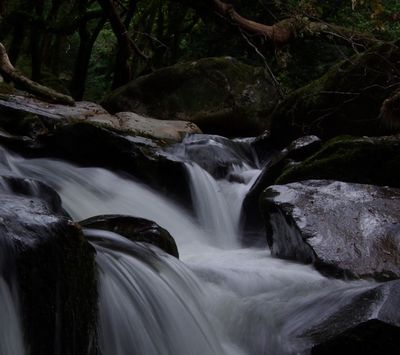
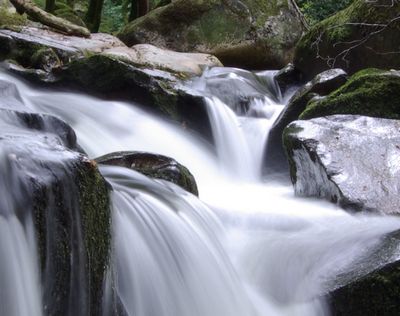
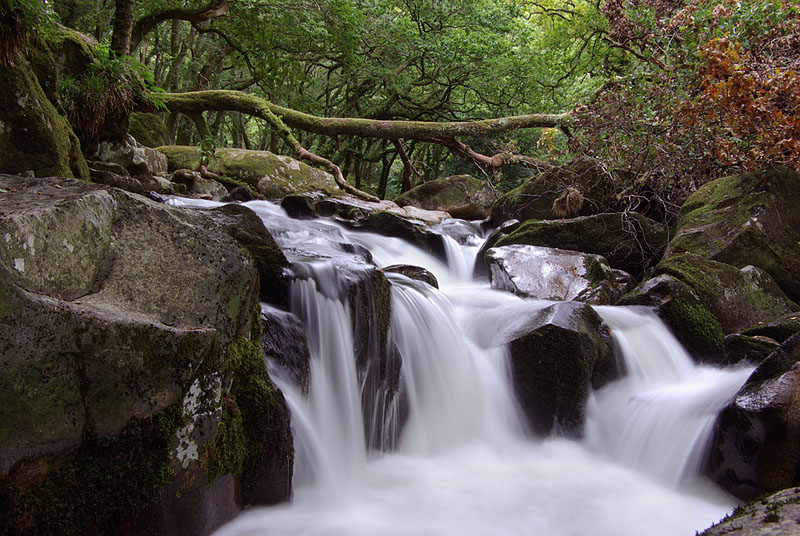
I never use this image as I was just messing with ideas and I don't think this works particularly, but it shows that if I want the woods to be light the water highlights are blown, unless I combine the two in some way.
There are lots of ways. Here, I just used PhotoShop. Proper HDR didn't work at all.
I happened to use two JPEGs but the OP's image had enough data to find the detail in all areas from the one shot.


Posted 04/07/2008 - 15:18
Link
You don't actually need TWO outputs from the RAW converter
For example:
* Load the image into your RAW converter
* Reduce the exposure so you are not clipping highlights
* Change the gamma so the image goes "flat" - this will bring up the shadows somewhat. Don't worry that it looks "yuck" - you'll fix that quickly in Photoshop
* Output the file in 16-bit TIFF
In Photoshop:
* Use a curves layer to bring up the appropriate areas - apply mask as appropriate
* Use another curve layer with an "S" shape to add contrast. Again, use the mask
* Manually dodge & burn by creating a blank layer, changing the blend mode to "Overlay" or "Soft Light" and painting black or white (10% soft brush).
To illustrate:
Here's a three shot HDR with Artizen.
And here's a single shot (processed a bit like the above... but with some other Photoshop techniques that I'm not letting on yet )
Have fun
Matt
For example:
* Load the image into your RAW converter
* Reduce the exposure so you are not clipping highlights
* Change the gamma so the image goes "flat" - this will bring up the shadows somewhat. Don't worry that it looks "yuck" - you'll fix that quickly in Photoshop
* Output the file in 16-bit TIFF
In Photoshop:
* Use a curves layer to bring up the appropriate areas - apply mask as appropriate
* Use another curve layer with an "S" shape to add contrast. Again, use the mask
* Manually dodge & burn by creating a blank layer, changing the blend mode to "Overlay" or "Soft Light" and painting black or white (10% soft brush).
To illustrate:
Here's a three shot HDR with Artizen.
And here's a single shot (processed a bit like the above... but with some other Photoshop techniques that I'm not letting on yet )
Have fun
Matt
http://www.mattmatic.co.uk
(For gallery, tips and links)
(For gallery, tips and links)
Add Comment
To leave a comment - Log in to Pentax User or create a new account.




3458 posts
20 years
Billericay,
Essex
But sadly the picture link is broken. I had a poke about in his Picasa gallery and I think it must have been one of the Burnham Beeches collection, but there are a lot in there and I don't remember it well enough to know which one.
I commented on its naturalness at the time.
To me the sky looks a little too vivid, and the ground looks a little lacking in contrast, but it's a nice photo never-the-less.
Sorry to Darkmunk and Argee for taking this thread off topic, but that is something that tends to happen, just like any conversation. Yesterday at work we were talking about chickens, the next instant it had turned to rights of access across my friend's cousin's back garden.
Dan