MX-1 Lens Profile

Posted 11/06/2014 - 17:11
Link
Thanks Matt, I'll try and give this a go later on.
Posted 11/06/2014 - 23:18
Link
Thanks again Matt had a quick go and it works well for me, for windows users the profile goes here:
"C:/Users/username/AppData/Roaming/Adobe/CameraRaw/LensProfiles/1.0"
Here's one I tried (high iso and noisy but it did have some distortion)
Before lens correction
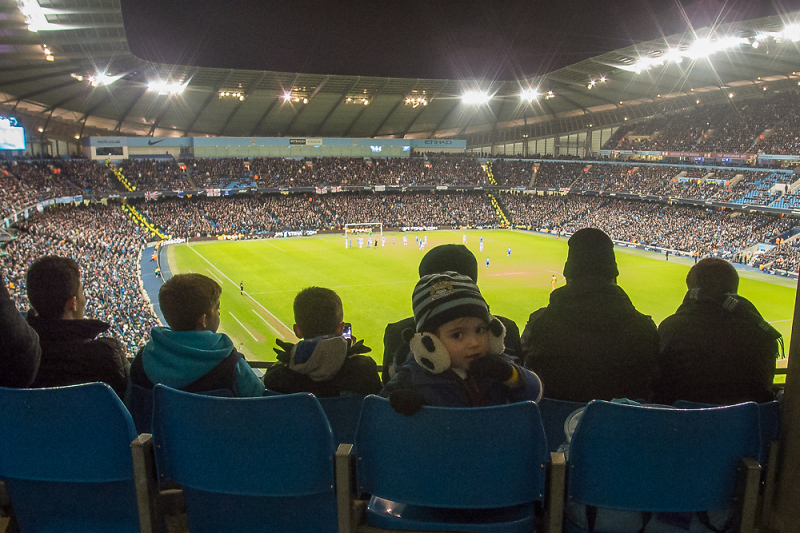
After lens correction using Matts profile
"C:/Users/username/AppData/Roaming/Adobe/CameraRaw/LensProfiles/1.0"
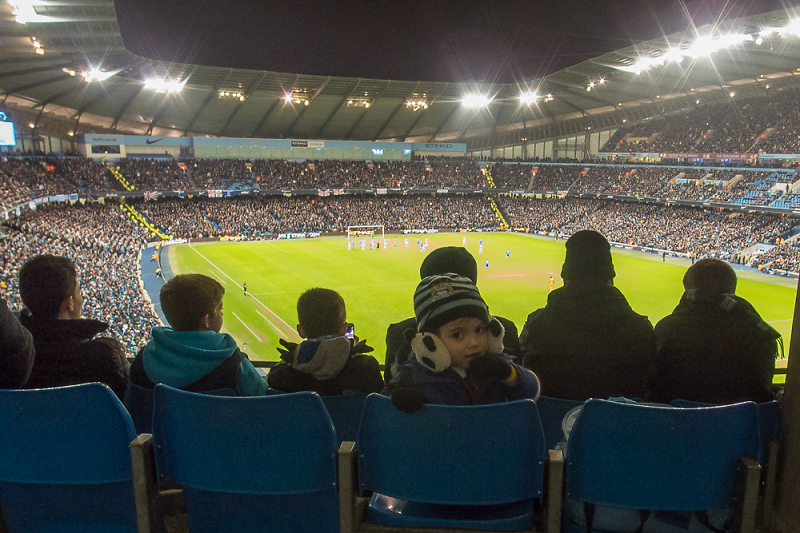
Here's one I tried (high iso and noisy but it did have some distortion)
Before lens correction

After lens correction using Matts profile


Posted 04/10/2014 - 16:48
Link
Not at my computer now. Is this just a file that you add to the directory?

Posted 04/10/2014 - 23:45
Link
This forum strips slashes, goodness knows why:
But yes, add it to
ProgramData-Adobe-CameraRaw-LensProfiles-1.0-Pentax
But yes, add it to
ProgramData-Adobe-CameraRaw-LensProfiles-1.0-Pentax
Posted 08/10/2014 - 15:21
Link
Downloaded and installed it. Now to test it. Thanks for your help.
Add Comment
To leave a comment - Log in to Pentax User or create a new account.




5870 posts
24 years
Sussex,
UK
It's designed for the RAW files from the MX-1.
On the Mac, you shove the .lcp file in "~/Library/Application Support/Adobe/CameraRaw/LensProfiles/1.0/" (best to copy this to the clipboard, then Cmd+Shift+G in Finder and paste in the location)
No idea where it goes on Windows
The profile could be a bit better I reckon. It is a real faff making it, but this has 3 zoom positions and two apertures and does a pretty decent job. Only thing is that it's oddly different in the distortion correction compared to the in-camera JPG correction. Can't see exactly why!
Let me know how it works! (And donations gratefully accepted :lol
http://www.photon.me.uk/pu/mx1/PENTAX-MX-1-lcp.zip
Eventually it should appear through Adobe's Lens Profile Downloader app...
Matt
(For gallery, tips and links)