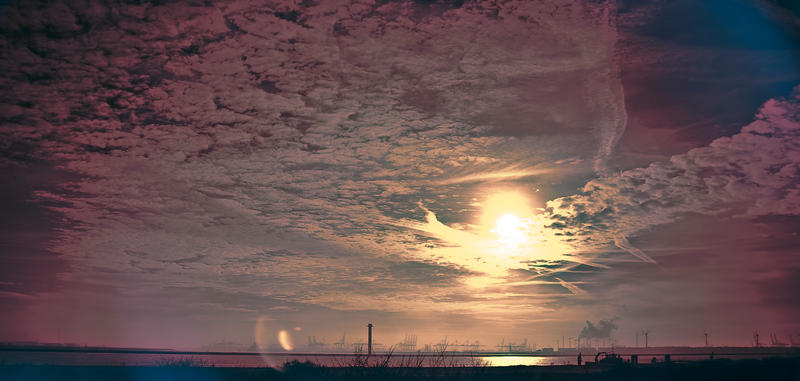
First try on infrared

Posted 22/02/2009 - 20:28
Link
A very striking photo Stefan, and not at all what I was expecting. Years ago a friend of mine was in charge of a group of air cadets on a night excercise and he took some IR pictures with his film SLR. They came out looking more like those daft "haunted" programs on the box.


Posted 22/02/2009 - 22:49
Link
Oggy wrote:
A very striking photo Stefan, and not at all what I was expecting. Years ago a friend of mine was in charge of a group of air cadets on a night excercise and he took some IR pictures with his film SLR. They came out looking more like those daft "haunted" programs on the box.
Well this one was a bit photoshoped A very striking photo Stefan, and not at all what I was expecting. Years ago a friend of mine was in charge of a group of air cadets on a night excercise and he took some IR pictures with his film SLR. They came out looking more like those daft "haunted" programs on the box.
This is the photo without any photoshoping

Mike,
I was also tempted to remove to lens flare but it's hard to do without leaving a mark. Next time I will use another lens that will flare a bit less
Stefan

K10D, K5
DA* 16-50, DA* 50-135, D-FA 100 Macro, DA 40 Ltd, DA 18-55
AF-540FGZ

K10D, K5
DA* 16-50, DA* 50-135, D-FA 100 Macro, DA 40 Ltd, DA 18-55
AF-540FGZ

Posted 23/02/2009 - 06:54
Link
Stefan
Looks nice, the top one, after you have worked on it. I really like the way the clouds are so closely scattered, gives a nice impression to the eye. It does become captivating in my view.
Like Mike said that little reflected circle on the bottom is a bit distracting, otherwise a great image.
But I see you have already done a lot of work on PP , to remove all the glare, I guess the little one is just one stubborn one huh?
Looks nice, the top one, after you have worked on it. I really like the way the clouds are so closely scattered, gives a nice impression to the eye. It does become captivating in my view.
Like Mike said that little reflected circle on the bottom is a bit distracting, otherwise a great image.
But I see you have already done a lot of work on PP , to remove all the glare, I guess the little one is just one stubborn one huh?
Amin Photo Gallery

Posted 23/02/2009 - 09:15
Link
Out of interest, what kind of infrared filter did you use?

Posted 23/02/2009 - 20:04
Link
I have an K110D that has been converted to shoot infrared images - my understanding is that a filter is used that blocks most light in the visible spectrum, only letting light above around 720nm through (thus the filter is near opaque black when looking at it), as infrared light is, well, red you get the reddish coloured hue in your images. to reduce this, you would set a custom white balance which would bring the image usually to a blueish white and any plants would appear white/gray (woods effect) depending on how much IR light is available.
IR images tend to look better in black and white after processing, but the weaker the IR filter, the more visible light can get through and add colour to your images. IR shots can also be cross processed to give more surreal colours. I'm not sure if Stefan has used an IR filter, or just a deep red filter as there is a distinct lack of the associated woods effect in the shot.
BTW, I really like this shot and the processing has been done exceptionally well considering the flare; just not sure if its IR or not.
Brian.
IR images tend to look better in black and white after processing, but the weaker the IR filter, the more visible light can get through and add colour to your images. IR shots can also be cross processed to give more surreal colours. I'm not sure if Stefan has used an IR filter, or just a deep red filter as there is a distinct lack of the associated woods effect in the shot.
BTW, I really like this shot and the processing has been done exceptionally well considering the flare; just not sure if its IR or not.
Brian.
Posted 23/02/2009 - 20:08
Link
Wow thank you all for your great reaction
Brian, the filter was 89B from Ckoin for the Z-PRO holder
Amin, as far as removing the flare goes, I only cropped the bottom half away from the image since that wasn't interesting, you can still see the big flares as a blue haze in the top right corner and on the left side of the very bright flare.
Alan, this was the photo when it came out from Adobe lightroom to Photoshop as you can see I did all the colours there.
To be honest I need to look back what I did since I just played around till I had what I wanted.
...
Okay I found out what I did.
If you know Lightroom you've on the right side in the devoloping window althose options to processes your photo.
what it comes down to is this.
1. play with the option under the "camera calibration" to get the reds down and get the contrast more like you want.
for those without lightroom you adjust the hue and satuartion of the colours where the photo is build up with so red, green and blue.
2. i used "split tone" to give the highlights and the shadows diffrent colours that's where the colours really come from. when you have done this you can play a bit with the white balance and tweak the rest.
In photoshop I played a bit with the curves but most of the effect you see comes form a duplicated layer set to soft-light it boost darks and such, just try it with a photo you have I would say. It's a nice effect and easy to adjust and use.
I don't really think my photo is a good example of an infrared photo sine you don't have those unique contrast you have when shooting infrared from differend trees and flowers. You really see unique things then.
Here are some tutorials
link
link < I like how the photo he used came out
link
Brian, the filter was 89B from Ckoin for the Z-PRO holder
Amin, as far as removing the flare goes, I only cropped the bottom half away from the image since that wasn't interesting, you can still see the big flares as a blue haze in the top right corner and on the left side of the very bright flare.
Alan, this was the photo when it came out from Adobe lightroom to Photoshop as you can see I did all the colours there.

To be honest I need to look back what I did since I just played around till I had what I wanted.
...
Okay I found out what I did.
If you know Lightroom you've on the right side in the devoloping window althose options to processes your photo.
what it comes down to is this.
1. play with the option under the "camera calibration" to get the reds down and get the contrast more like you want.
for those without lightroom you adjust the hue and satuartion of the colours where the photo is build up with so red, green and blue.
2. i used "split tone" to give the highlights and the shadows diffrent colours that's where the colours really come from. when you have done this you can play a bit with the white balance and tweak the rest.
In photoshop I played a bit with the curves but most of the effect you see comes form a duplicated layer set to soft-light it boost darks and such, just try it with a photo you have I would say. It's a nice effect and easy to adjust and use.
I don't really think my photo is a good example of an infrared photo sine you don't have those unique contrast you have when shooting infrared from differend trees and flowers. You really see unique things then.
Here are some tutorials
link
link < I like how the photo he used came out
link
Stefan
K10D, K5
DA* 16-50, DA* 50-135, D-FA 100 Macro, DA 40 Ltd, DA 18-55
AF-540FGZ
K10D, K5
DA* 16-50, DA* 50-135, D-FA 100 Macro, DA 40 Ltd, DA 18-55
AF-540FGZ

Posted 23/02/2009 - 20:31
Link
impotentspider wrote:
I thought Infrared was something unique to B&W photography? I know the effect can be re-produced on digital but where does the colour come into it?
Lets have an explanation Stefan
PS, nice effect though.
The problem with the K10D is that it is hardly sensitive to IR so that even with an IR pass filter it only acts as a really hard ND filter.I thought Infrared was something unique to B&W photography? I know the effect can be re-produced on digital but where does the colour come into it?
Lets have an explanation Stefan
PS, nice effect though.
Have a look at some IR images from a K100 or a *ist camera and they are radically different. They look like film IR shots rather than colour with a hint of IR.
Posted 23/02/2009 - 21:18
Link
Tyr wrote:
Have a look at some IR images from a K100 or a *ist camera and they are radically different. They look like film IR shots rather than colour with a hint of IR.
Yes you're right all the models after the K10D have an filter infront of the sensor that limits the use off infrared so you need to use long exposure and can't use strong infrared filters since they really work like ND filters
impotentspider wrote:
I thought Infrared was something unique to B&W photography? I know the effect can be re-produced on digital but where does the colour come into it?
Lets have an explanation Stefan
PS, nice effect though.
The problem with the K10D is that it is hardly sensitive to IR so that even with an IR pass filter it only acts as a really hard ND filter.I thought Infrared was something unique to B&W photography? I know the effect can be re-produced on digital but where does the colour come into it?
Lets have an explanation Stefan
PS, nice effect though.
Have a look at some IR images from a K100 or a *ist camera and they are radically different. They look like film IR shots rather than colour with a hint of IR.
Stefan
K10D, K5
DA* 16-50, DA* 50-135, D-FA 100 Macro, DA 40 Ltd, DA 18-55
AF-540FGZ
K10D, K5
DA* 16-50, DA* 50-135, D-FA 100 Macro, DA 40 Ltd, DA 18-55
AF-540FGZ

Posted 25/02/2009 - 16:50
Link
isdky wrote:
my understanding is that a filter is used that blocks most light in the visible spectrum, only letting light above around 720nm through (thus the filter is near opaque black when looking at it).... reddish coloured hue in your images to reduce this, you would set a custom white balance which would bring the image usually to a blueish white and any plants would appear white/gray (woods effect) depending on how much IR light is available.
I'm not sure if Stefan has used an IR filter, or just a deep red filter as there is a distinct lack of the associated woods effect in the shot.
BTW, I really like this shot and the processing has been done exceptionally well considering the flare; just not sure if its IR or not.
Brian.
Cokin said it's a infrared filter and to be honest I've no idea it really is one, I simply went for the name my understanding is that a filter is used that blocks most light in the visible spectrum, only letting light above around 720nm through (thus the filter is near opaque black when looking at it).... reddish coloured hue in your images to reduce this, you would set a custom white balance which would bring the image usually to a blueish white and any plants would appear white/gray (woods effect) depending on how much IR light is available.
I'm not sure if Stefan has used an IR filter, or just a deep red filter as there is a distinct lack of the associated woods effect in the shot.
BTW, I really like this shot and the processing has been done exceptionally well considering the flare; just not sure if its IR or not.
Brian.
the glass looks like this.

I didn't custom balance the white balance as you can see and adobe raw doesn't have the range to do that so need to find another program to balance it if you want to see that version.
and okay I will try to get the flare away
Stefan
K10D, K5
DA* 16-50, DA* 50-135, D-FA 100 Macro, DA 40 Ltd, DA 18-55
AF-540FGZ
K10D, K5
DA* 16-50, DA* 50-135, D-FA 100 Macro, DA 40 Ltd, DA 18-55
AF-540FGZ
Add Comment
To leave a comment - Log in to Pentax User or create a new account.




10412 posts
18 years
Dordrecht,
the Netherlands
Full Size: link
Model: PENTAX K10D
Lens: DA 18-250mm
Shutter Speed: 1 second
F Number: F/5.6
Focal Length: 18 mm
ISO Speed: 400
Date Picture Taken: Feb 21, 2009, 5:40:23 PM
Programs Used: Lightroom 2.2 & Photoshop CS4 Ext.
The photo was taken yesterday when we went on a hike to Hook of Holland.
Landscapes really aren't my thing but the sky was just beautiful so couldn't resist to take some snaps ^^
K10D, K5
DA* 16-50, DA* 50-135, D-FA 100 Macro, DA 40 Ltd, DA 18-55
AF-540FGZ