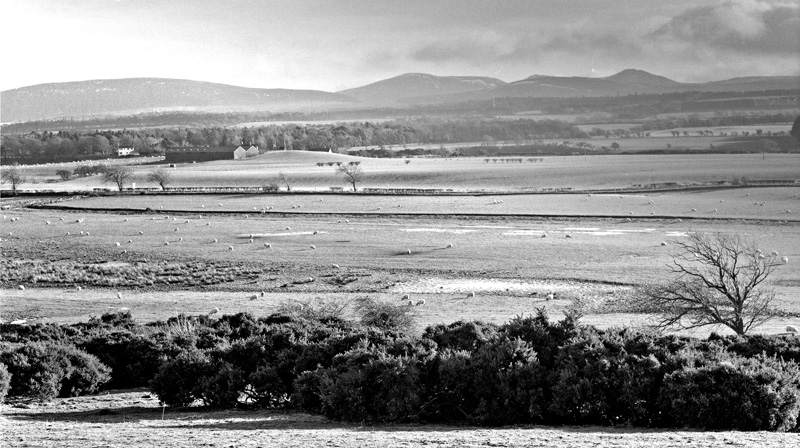
First B&W with Pentax 645

Posted 12/01/2008 - 07:08
Link
Love the mood in the 2 first ones. The 3rd one is a bit flat
Nice work.
Nice work.

Posted 12/01/2008 - 09:53
Link
I'm still getting the hang of scanning and post-processing B&W images - getting the balance between punchy contrast and retaining detail seems tricky.
Here's another from the same day (although with a Pentax 75mm F2.8 & Ilford Sensio 400) that I've tried to make a bit more interesting.

Here's another from the same day (although with a Pentax 75mm F2.8 & Ilford Sensio 400) that I've tried to make a bit more interesting.


Posted 12/01/2008 - 09:55
Link
I think they need better sharpness and more contrast. The first image comes closest in this respect.
Best regards, John

Posted 12/01/2008 - 10:33
Link
I agree with John
The blacks are fine, its the highlights that need work on; theyre on the grey side.
The blacks are fine, its the highlights that need work on; theyre on the grey side.
Posted 12/01/2008 - 13:52
Link
I've been doing some further work on scanning and processing the images - does anyone have any good links for hints/tips on scanning B&W?
This is a different take on the 3rd image in the 1st post.

This is a different take on the 3rd image in the 1st post.

Posted 12/01/2008 - 13:56
Link
Are you scanning negs or prints?
Ken
Ken
Ken
“We must avoid however, snapping away, shooting quickly and without thought, overloading ourselves with unnecessary images that clutter our memory and diminish the clarity of the whole.” - Henri Cartier-Bresson -
“We must avoid however, snapping away, shooting quickly and without thought, overloading ourselves with unnecessary images that clutter our memory and diminish the clarity of the whole.” - Henri Cartier-Bresson -
Posted 12/01/2008 - 14:07
Link
Quote:
Are you scanning negs or prints?
There are all from negatives.
Are you scanning negs or prints?
Posted 12/01/2008 - 14:20
Link
I dont know what you are using to scan with but this was/is my set up. I've a Minolta Dimage IV 35mm scanner and using the supplied software the results were OKish but seemed to accentuate grain and the results were quite disappointing compared with scanned 10x8 prints from my HP all in one scanner/copier/printer (I mention this since it probably isn't the best scanner that money can buy).
Partly on account of moving to MS Vista, I've had to change my scanning software to Vuescan ($40 or so). First impressions are that this is producing far more pleasing results and the interface is far more intuitive.
I'm guessing you're using a flatbed scanner for your 120 negs which might not be a great way to do it anyway but Vuescan works with flatbed scanners too. It might be worth looking at their web site to check if it is compatible with your machine www.hamrick.com.
My own method is to cop out and just have negs and trannies scanned by the lab at the time of processing
Ken
Partly on account of moving to MS Vista, I've had to change my scanning software to Vuescan ($40 or so). First impressions are that this is producing far more pleasing results and the interface is far more intuitive.
I'm guessing you're using a flatbed scanner for your 120 negs which might not be a great way to do it anyway but Vuescan works with flatbed scanners too. It might be worth looking at their web site to check if it is compatible with your machine www.hamrick.com.
My own method is to cop out and just have negs and trannies scanned by the lab at the time of processing
Ken
Ken
“We must avoid however, snapping away, shooting quickly and without thought, overloading ourselves with unnecessary images that clutter our memory and diminish the clarity of the whole.” - Henri Cartier-Bresson -
“We must avoid however, snapping away, shooting quickly and without thought, overloading ourselves with unnecessary images that clutter our memory and diminish the clarity of the whole.” - Henri Cartier-Bresson -
Posted 12/01/2008 - 14:34
Link
You don't seem to be getting much punch from the scans, but it's difficult to comment without knowing your method in detail.
The alternative to scanning, if your scanner is the weak link, is to tape a medium format negative to a light box, make sure the room is dark to avoid reflections and use a macro lens to make a direct digital image with your DSLR. On the face of it, this should give better results than you are getting now.
The alternative to scanning, if your scanner is the weak link, is to tape a medium format negative to a light box, make sure the room is dark to avoid reflections and use a macro lens to make a direct digital image with your DSLR. On the face of it, this should give better results than you are getting now.
Best regards, John

Posted 12/01/2008 - 15:05
Link
I'm not a b&w expert and I don't do much scanning so I can't offer advice, but I do think the very first photo is stunning. I'd have it on my wall...
Joining the Q
Posted 12/01/2008 - 15:26
Link
Just had a root around, this is a lab scan (B+S) from a 400ASA neg. 15th sec @ f2.8 with the 55mm/2.8, just a snap really across the kitchen table, the light source is a single window 15 feet behind the camera


Ken
“We must avoid however, snapping away, shooting quickly and without thought, overloading ourselves with unnecessary images that clutter our memory and diminish the clarity of the whole.” - Henri Cartier-Bresson -
“We must avoid however, snapping away, shooting quickly and without thought, overloading ourselves with unnecessary images that clutter our memory and diminish the clarity of the whole.” - Henri Cartier-Bresson -
Posted 12/01/2008 - 15:58
Link
Is that the scan as supplied, or after you've worked on it Ken?
Dan
Dan
K-3, a macro lens and a DA*300mm...
Posted 12/01/2008 - 16:03
Link
Not quite, Dan, I applied a blue tone but that's all, it isn't the highest resolution scan either since I was just testing the camera after a service. The original file size is only 413kb. It was shot in very low light and the neg is very thin hence the crushed shadows, I quite like it for some reason though.
EDIT: I wish my eyes looked so bright the morning after a party!
Ken
EDIT: I wish my eyes looked so bright the morning after a party!
Ken
Ken
“We must avoid however, snapping away, shooting quickly and without thought, overloading ourselves with unnecessary images that clutter our memory and diminish the clarity of the whole.” - Henri Cartier-Bresson -
“We must avoid however, snapping away, shooting quickly and without thought, overloading ourselves with unnecessary images that clutter our memory and diminish the clarity of the whole.” - Henri Cartier-Bresson -
Posted 12/01/2008 - 16:49
Link
Ken - what lab are you using to do your development & scans? I had the developing done at Trumps in Edinburgh this time however I wasn't that impressed. All the films have marks/splashes on them and the even managed to lose one of my films for a few days.
I'm scanning using an Epson 4490 flatbed at the moment. The main difficulty I'm finding is in getting the right balance between drama and detail. If I go for a high contrast, punch image then I'm losing highlight and shadow detail.
I'm not great at converting digital shots to B&W either, for similar reasons.
I'm scanning using an Epson 4490 flatbed at the moment. The main difficulty I'm finding is in getting the right balance between drama and detail. If I go for a high contrast, punch image then I'm losing highlight and shadow detail.
I'm not great at converting digital shots to B&W either, for similar reasons.
Add Comment
To leave a comment - Log in to Pentax User or create a new account.




829 posts
20 years
Edinburgh
Lens for all shots was a Carl Zeiss Biometar 80mm F2.8 fitted using a Pentacon 6 -> P645 adaptor.
Lots of flare (straight into the sun, no hood) in this one but I like the atmosphere of it.
I'm not getting as much dynamic range as I'd like into the scans yet.